How to Implement a Cyber Security Audit—A 3-Step Guide

Major data breaches are making headlines daily, with ransomware and supply chain attacks growing more sophisticated. Businesses that overlook cybersecurity blind spots risk serious breaches, making it essential to regularly assess security measures through a cyber security audit.

A cyber security audit provides clear visibility into your organisation’s security posture, helping identify threats before they escalate. While audits may seem complex, following a structured approach makes them manageable and highly effective. 

In this guide, we’ll walk you through a simple three-step process to strengthen your cyber defences.

What is a Cyber Security Audit?

A cyber security audit is a comprehensive assessment of an organisation’s security measures, identifying vulnerabilities, compliance gaps, and potential threats. It ensures systems, policies, and defences are effective in protecting sensitive data against cyber risks, helping businesses stay secure and compliant.

Why Are Audits Important?

With cyber threats evolving daily, businesses must ensure their security measures stay ahead. The Australian Signals Directorate (ASD) received over 87,000 cybercrime reports last year—one every six minutes, highlighting the growing risks. 

Without regular cyber security audits, unnoticed gaps can lead to costly breaches, regulatory non-compliance, and reputational damage.

Failing to meet security standards not only increases the chance of an attack but also exposes businesses to hefty fines and legal consequences. Audits help identify weak points, allowing security teams to strengthen protections and prioritise risks before they become serious incidents.

How to Perform a Cyber Security Audit in 3 Steps

Regular cyber security audits are essential for keeping your business protected. By following a structured process, you can identify security gaps, address risks, and ensure compliance. Here’s a simple three-step guide to conducting an effective audit.

1. Define the Scope

Start by deciding what your audit will cover. This helps ensure a focused approach and avoids missing critical areas. Ask yourself:

  • Why are we performing the audit?
  • Who are the key stakeholders?
  • How will the audit be conducted?

Key areas to review include:

  • IT infrastructure (hardware, networks, and software)
  • Storage, transmission, and protection of sensitive data
  • Physical security practices (access controls, surveillance)
  • Cyber security policies and procedures
  • Compliance with industry regulations

If your audit is for compliance, ensure you understand the exact requirements of the framework or regulation you’re reviewing. Some may also require an external audit.

  • As cyber threats evolve, traditional security struggles to keep up, leaving businesses exposed. With nearly 90% of organisations adopting zero-trust security, it’s becoming the go-to solution. Is it right for you? Learn more about zero-trust security.

2. Identify Security Threats

Once the scope is clear, assess the threats that could impact your business. Common cyber risks include:

  • DDoS Attacks – Overloading a website with fake traffic to crash its server
  • Malware & Ransomware – Malicious software that damages or encrypts data for ransom
  • Shadow IT – Unapproved employee use of apps or devices outside IT oversight
  • Social Engineering – Tricks like phishing emails to steal sensitive data
  • Stolen Passwords – Hackers using leaked credentials from past data breaches
  • SQL Injections – Exploiting security gaps in web applications to access databases
  • Zero-Day Exploits – Hacking vulnerabilities before developers issue a fix

To detect threats before they cause damage, implement continuous monitoring tools that alert your security team in real-time.

  • With data breaches on the rise in Australia, the risk of being hacked is higher than ever—sometimes without you even knowing. Learn the signs of a hack and how to protect yourself. Find out more.
  • Web DDoS attacks surged 550% in 2024, driven by AI, geopolitical tensions, and hacktivist activity—read more here

3. Plan Your Response

After identifying threats, you need a clear action plan to manage and reduce risks. A strong incident response plan should include:

  • Prioritisation of Risks – Address high-risk vulnerabilities first with fixes like software patching and network segmentation
  • Business Continuity Plan – Ensure data recovery and system restoration after a security incident
  • Security Tools & Documentation – Maintain a record of security controls, detection systems, and response protocols
  • Communication & Training – Educate employees on cyber security best practices to prevent human errors

A well-documented response plan helps protect your business and makes future audits smoother by demonstrating your commitment to security.

Strengthen Your Cyber Security with Regular Audits

As Australia moves towards becoming a global leader in cyber security by 2030, businesses must take a proactive approach to safeguarding their systems. Cyber security audits are essential for identifying vulnerabilities, mitigating risks, and ensuring compliance.

With cyber resilience now recognised as a shared responsibility, audits help embed security into every level of an organisation, from leadership to employees. Regular assessments strengthen defences, align with national security goals, and prevent costly breaches. 

Taking action today ensures businesses remain resilient in an increasingly complex threat landscape. If you’re looking to improve your cyber security audit process or need expert guidance, get in touch to learn how to make your cyber security assessments more effective.

Sources: ASD ; Security Brief Australia ; Australian Cyber Security Magazine 

Understanding ChatGPT Privacy: What Users Need to Know

ChatGPT is everywhere right now, and for good reason—it’s powerful, exciting, and full of potential. Whether it’s helping write reports, creating complex programming code, or even looking up recipes, it’s deeply transforming the way we live our day-to-day lives.

But here’s the thing: like any tool, it comes with risks. If it’s not used properly, especially in business, it can expose sensitive data and raise privacy concerns. That’s why understanding ChatGPT privacy is so crucial.

What is ChatGPT Privacy, and Why Does it Matter?

ChatGPT privacy refers to safeguarding user data and conversations while using the platform. Protecting sensitive information ensures that businesses and individuals can leverage ChatGPT’s capabilities without risking data breaches or unauthorised access.

ChatGPT: An Overview

ChatGPT, developed by OpenAI, is an advanced tool powered by generative AI. It delivers human-like responses to a wide range of queries, from solving maths problems to writing resumes or jokes, acting as a versatile, supercharged assistant.

To achieve this, ChatGPT uses knowledge databases, open data sources, and user feedback. It also gathers information via social media and web scraping, combining countless online data points to deliver accurate and reliable responses for various complex tasks.

  • OpenAI faces an unexpected challenger in China’s DeepSeek—learn more here

Why Does Generative AI Raise Privacy Concerns?

In December 2024, OpenAI faced a €15 million fine in Italy for violating privacy regulations, highlighting the risks generative AI can pose to sensitive user data. Understanding these risks is essential to safeguarding your information:

  1. ChatGPT May Be Accessing Your Data Without Your Knowledge

While using ChatGPT, you may unknowingly provide data that the platform stores and uses to train its algorithms. This can include sensitive or personal details that you may not have intended to share.

  1. Your Inputs Are Stored and Contribute to Its Learning

Every interaction with ChatGPT is logged to improve its performance. This means anything you type becomes part of its data repository, potentially making your private information accessible or traceable.

  1. ChatGPT Gathers Extensive User Information

ChatGPT collects a significant amount of user data, such as location, device information, and IP addresses. While this data helps optimise its functionality, it also creates opportunities for misuse or unintentional exposure.

  1. Vulnerability to Data Breaches

AI platforms like ChatGPT are not immune to cyberattacks. In the event of a data breach, stored user inputs and collected data could be exposed, putting personal and business information at significant risk.

How Can I Protect My Privacy While Using ChatGPT?

While no privacy solution is foolproof, taking proactive steps can significantly reduce the risk of your data being compromised. Here are five actionable tips to help you safeguard your personal information when using ChatGPT:

  1. Be Mindful of What You Share
    Avoid inputting personal, financial, or sensitive details into ChatGPT. Any data shared in prompts could inadvertently end up stored or accessed by third parties, so always think twice before submitting information.
  2. Delete or Disable Chat History
    By default, ChatGPT stores your conversations to enhance its training. Turning off chat history ensures that your inputs aren’t permanently logged, providing an extra layer of privacy protection.
  3. Stay Anonymous
    To prevent your personal data from being tied to your usage, set up a separate email address for ChatGPT interactions and limit the personal details you provide. Using a pseudonym can also help mask your identity.
  1. Keep Up with Privacy Policies
    Regularly review ChatGPT’s privacy and data retention policies to understand how your data is stored, used, and shared. Knowing what happens to your conversations ensures you remain informed and in control.
  2. Seek Expert Advice
    When in doubt, consult an IT professional for guidance on data protection and AI usage. Their expertise can help you navigate potential risks, implement best practices, and keep your information secure.

By following these steps, you can enjoy the benefits of ChatGPT while maintaining control over your privacy and security. For sensitive issues, however, it’s always best to choose a more secure alternative.

Balancing Innovation and Privacy: A Final Thought

ChatGPT and generative AI have transformed the way we interact with technology, offering incredible convenience and innovation. However, as the recent privacy concerns have shown, using these tools responsibly is key to protecting your information.

By staying informed about ChatGPT privacy and taking simple precautions, you can confidently use ChatGPT without compromising your privacy. If you have any questions or need further advice, don’t hesitate to get in touch—we’re here to help.

Sources: Reuters ; OpenAI ; The Drum ; Wikipedia 

How AI Cloud Computing is Transforming Business Operations

Not long ago, cloud computing was primarily about storage and scalability—allowing businesses to securely store data and access it on demand. While revolutionary, it was limited in its intelligence to adapt or predict needs.

Today, AI has enhanced cloud computing into a dynamic force, enabling real-time decision-making, automation, and predictive analytics. This evolution has not only improved efficiency but has also redefined how businesses manage security, operations, and innovation in an ever-evolving digital environment.

This blog explores the many ways AI cloud computing is reshaping business operations. By uncovering potential gaps in IT security and operations, we’ll reveal how embracing this technology can empower your business for a smarter, more resilient future.

What Is AI Cloud Computing and How Does It Work?

AI cloud computing combines artificial intelligence with cloud technology to deliver advanced analytics, automation, and decision-making capabilities. Businesses can leverage AI-powered tools hosted in the cloud for increased efficiency, cost savings, and operational agility.

Key Ways AI Cloud Computing Is Changing Businesses

1. Enhanced Decision-Making Through AI Insights

AI is the new electricity. It has the potential to transform every industry,” said Andrew Ng, a leading figure in AI. This transformative power is evident in AI cloud computing, where real-time analytics enable businesses to make precise, data-driven decisions. 

By analysing vast datasets, AI uncovers patterns and trends that humans might overlook, paving the way for smarter, faster actions. Features include:

  • Real-time data insights reveal emerging market opportunities
  • Predictive analytics anticipate customer behaviour and needs
  • Automated decision-support tools streamline operational workflows

AI cloud computing doesn’t just analyse data—it uncovers the stories within it, turning complexity into clarity. Businesses can now act with confidence, knowing their strategies are backed by insights once hidden in plain sight.

2. Streamlining IT Security and Risk Management

AI has disrupted the cybersecurity landscape, creating challenges for businesses to stay ahead. Paradoxically, while AI enhances data protection, it also equips hackers with sophisticated tools to breach systems.

AI-powered cloud tools can continuously monitor systems, detect vulnerabilities, and respond to threats before they escalate. Features include:

  • Proactive threat detection
  • Automated patch management
  • Secure backup and recovery systems

Learn more about how AI is changing the game in cyber security 

3. Improved Operational Efficiency

Automation has transformed from manual, labour-intensive processes to real-time, AI-driven operations. With the generative AI market set to grow by $320 billion between 2024 and 2030—a remarkable 887.41% increase—this is just the beginning (Statista).

AI cloud computing builds on this evolution, revolutionising routine tasks and freeing teams to focus on strategic priorities:

  • Automating inventory management for improved accuracy and efficiency
  • Streamlining supply chain operations to minimise delays and optimise logistics
  • Enhancing customer support with AI chatbots delivering instant assistance

The transformative impact of AI cloud computing extends beyond operational improvements. By reallocating resources and enhancing productivity, businesses can position themselves for innovation and long-term growth in an increasingly competitive landscape.

Benefits Tailored for Your Businesses

Affordability and Scalability

AI cloud solutions scale with your business needs, offering cost-effective entry points. You can pay for what you need without overcommitting to infrastructure.

Accessibility for Teams

With cloud-hosted tools, your teams can access critical systems from anywhere, ensuring business continuity and flexibility.

Having a team trained in cybersecurity is crucial to proactively identifying threats, safeguarding sensitive data, and ensuring your business remains resilient against evolving cyber risks—read more here

Reduced Downtime Risks

AI’s predictive capabilities ensure potential system failures are addressed before they disrupt operations.

A disaster recovery plan is essential for minimising downtime, protecting critical data, and ensuring business continuity in the face of unexpected disruptions or cyber threats—read more here

Addressing Security Gaps with AI Cloud Computing

Cybersecurity remains a critical vulnerability for businesses, often exposing sensitive data to advanced threats. A recent incident, dubbed the “LLMjacking scheme,” revealed how malicious actors are exploiting generative AI models to gain unauthorised access to critical cloud systems—learn more here

AI cloud platforms tackle these emerging challenges by leveraging machine learning to stay ahead of evolving threats. By adapting to real-time risks, these platforms create a resilient defence for safeguarding sensitive business information:

  • Continuous monitoring of digital infrastructure to identify anomalies early
  • Real-time alerts to respond to suspicious activities before they escalate
  • Integration with compliance management systems to ensure regulatory adherence

The LLMjacking incident highlights the importance of adopting AI-driven solutions to address security gaps, ensuring businesses can defend against increasingly sophisticated cyber threats. 

Read here for the 8 security red flags to watch out for

Future Trends in AI Cloud Management

AI and cloud computing will continue to evolve symbiotically, driving hyperautomation and enabling businesses to operate at unprecedented efficiency and adaptability while prioritising transparency and ethical AI practices.

  • Hyperautomation: AI will increasingly automate and streamline cloud operations, reducing technical debt and enhancing modernisation efforts.
  • Autonomous Cloud Operations: Real-time adaptation to demand fluctuations, security threats, and operational challenges will make cloud management more resilient and efficient.
  • Specialised AI Platforms: Industry-specific AI cloud solutions will dominate, enhancing interoperability and aligning with ethical AI standards.
  • Transparency in AI Decision-Making: Greater emphasis will be placed on interpretability and trust in AI-driven cloud management to encourage broader adoption.

This evolution will drive operational efficiency, innovation, and trust, allowing organisations to focus on strategic goals while AI manages complex cloud environments.

Practical Steps for Implementing AI Cloud Computing

  1. Assess Your Needs: Evaluate which business areas would benefit most from AI automation and analytics.
  2. Choose the Right Provider: Select a cloud partner offering industry-specific AI tools and security features.
  3. Train Your Team: Ensure staff are equipped to utilise new tools effectively.
  4. Monitor and Improve: Regularly review performance metrics to optimise your setup.

Cloud Solutions are cost-effective, scalable, & flexible—read more here

Let OneCloud IT Solutions Help Your Business

AI cloud computing isn’t just a trend—it’s a powerful tool reshaping how businesses operate. By embracing this technology, businesses can strengthen IT security, streamline processes, and unlock new growth opportunities.

Are you ready to future-proof your operations? Take the next step by exploring how our tailored solutions can support your business. Contact us today

Sources: Statistica ; Andrew Ng ; The Hacker News

The Rise of Remote IT Management: How to Keep Your Business Secure from Anywhere

Remote work has surged in recent years, with the latest ABS data from August 2023 showing that over one-third of the population works from home regularly. It’s a new reality which works for both employers and employees—but it brings with it some complex cybersecurity challenges.

Remote IT management offers specific tools and approaches which address these challenges. In this blog, we’ll take a look at some of these tools and approaches and shed a light on how you can ensure a secure and flexible work environment for your team members.

What is Remote IT Management?

Remote IT management enables companies to oversee, secure, and maintain their IT infrastructure from a distance. Using cloud-based tools, IT teams can monitor systems, resolve issues, and keep operations running smoothly, no matter where employees are located.

Four Key Areas for Effective Remote IT Management

1. Strengthen Your Cybersecurity with a Robust Remote Setup

Think about it—one phishing email or weak password could be all it takes for a hacker to get into your system. But with the right remote IT setup, you can keep your business secure and running smoothly.

  • Layer Your Defences: Use tools like firewalls, VPNs, and encryption to create a strong shield around your data.
  • Stay Up to Date: Regular software updates and patches are simple but critical for closing security gaps.
  • Train Your Team: Make sure everyone knows how to spot suspicious emails or websites—they’re your first line of defence.
  • Monitor in Real Time: Keeping an eye on your network 24/7 helps catch and stop problems before they escalate.

You don’t need to be a tech expert to protect your business. A few smart steps can make a huge difference in keeping everything secure, no matter where you’re working from.

2. Adopt Cloud-Based Management Tools

Cloud technology is essential for remote IT management, offering flexibility, accessibility, and scalability. With cloud-based tools, your IT team can monitor systems, update software, and respond to issues from anywhere. Popular cloud solutions for remote management include:

  • Cloud Storage: Centralised storage for secure, easy access to files.
  • Remote Monitoring and Management (RMM) Tools: RMM tools enable your IT staff to keep an eye on system performance and fix issues remotely.
  • Automation: Automate routine maintenance tasks to free up time for your IT team to focus on critical issues.

Implementing cloud tools makes it easier for businesses to manage IT operations, minimise downtime, and enhance productivity for a remote workforce.

3. Prioritise Regular Training and Support for Your Team

Technical measures alone aren’t enough; your team must understand and follow remote work security protocols. Regular training sessions keep everyone updated on the latest cyber threats, while support mechanisms ensure quick solutions to issues:

  • Security Training: Teach employees about phishing scams, password management, and secure remote access. They should know the red flags for cyber threats.
  • Remote Support Systems: Implement a remote support service for troubleshooting.
  • Clear IT Policies: Define policies for device use, data access, and remote network connections to minimise risk.

Focusing on training and clear guidelines for your team helps build a culture of cybersecurity awareness that strengthens remote management efforts. 

4. Monitor and Maintain Your Systems Proactively

Proactive monitoring is crucial for identifying and resolving potential issues before they affect your business. Effective remote IT management relies on:

  • 24/7 Monitoring Software: Constant monitoring helps detect unusual activity, enabling a swift response.
  • Regular Updates and Patches: Keep all systems updated to close security gaps and improve performance.
  • Data Backups: Secure data backups protect your business from data loss or ransomware attacks, helping you recover quickly in case of an emergency.

By taking a proactive approach, your business remains resilient against downtime, data breaches, and productivity loss, empowering you to operate confidently from any location.

  • To find out how costly a data breach might be for your business, read here

5. Consider Adopting a Zero Trust Approach

A report by Cisco reveals that almost 90% of organisations have begun implementing zero-trust security models. As businesses move to remote setups, traditional security models struggle to keep up. 

A zero trust approach offers a proactive solution, verifying every access request and limiting potential security breaches from within and outside.

Key features of zero trust include:

  • Continuous Verification: Requires each access request to be authenticated and authorised.
  • Least Privilege Access: Limits user access strictly to what’s necessary.
  • Enhanced Visibility: Provides real-time insights into user and device activities.
  • Reduced Lateral Movement: Prevents attackers from freely navigating the network if breached.

By adopting zero trust, businesses can secure their data effectively, building a more resilient, adaptable IT environment that meets today’s remote security demands.

Take Control of Your Remote IT Management Today

Effective remote IT management is all about staying secure, connected, and ready to tackle the future. By focusing on cybersecurity, streamlining operations, and keeping your systems updated, you’re setting your business up for success. 

Ready to strengthen your remote IT strategy? Contact us today—we’re here to help.

Sources: ABS ; CISCO ; IBM ; Australian Cyber Security Magazine
Zero-Trust Security Models: Here’s Why Your Business Might Need One

In an era where cyber threats evolve daily, traditional security measures are struggling to keep up. Hackers are finding new, unsuspecting ways to bypass outdated defences, which can leave businesses of all sizes vulnerable. 

So, what’s the solution? 

According to a report by multinational technology company Cisco, nearly 90% of organisations have started adopting zero-trust security models. This approach offers a more resilient approach, designed to protect every asset within your network. 

This blog delves into the zero-trust security model, helping you decide if it’s right for your business.

What is a Zero-Trust Security Model?

A zero-trust security model is a framework that treats every user, device, and connection as potentially untrustworthy, even within an organisation’s network. This model requires strict verification and access control to prevent unauthorised data access, significantly reducing the risk of breaches.

Understanding Zero-Trust Security Models

Zero-trust security models centre around the principle of “never trust, always verify”. Unlike traditional models, which often assume users inside the network are trustworthy, zero-trust assumes that all users—internal or external—may pose a threat. 

Implementing a zero-trust approach involves several key elements:

  • User Verification: Confirming each user’s identity before granting access.
  • Least Privilege Access: Limiting users to only the data they need to perform their roles.
  • Network Segmentation: Dividing the network into smaller parts to prevent widespread breaches.
  • Continuous Monitoring: Constantly tracking network activity to detect unusual behaviour.

For example, imagine an employee receives a phishing email and unknowingly clicks a malicious link. With zero-trust security, the system immediately flags unusual access attempts, isolating the threat before it spreads company-wide.

Why Traditional Security Models Fall Short

Traditional security models often rely on perimeter-based defences, assuming that anything inside the network is safe. This model has proven insufficient in the face of modern cyber threats, especially as remote work and cloud services erode these perimeter boundaries.

For example, the 2017 Equifax breach exposed data of 147 million people, revealing flaws in perimeter-based security. Attackers exploited a web vulnerability, accessed internal databases undetected, and remained unnoticed for over two months!

With a zero-trust model, businesses gain the ability to address these limitations. Every device, user, and application within the network is assessed individually, making it harder for hackers to move through systems undetected.

Key Components of Zero-Trust Security Models

Implementing a zero-trust security model involves the following core components:

  1. Identity and Access Management (IAM): Using multi-factor authentication (MFA) and strict access protocols to verify every user.
  2. Least Privilege Access: Minimising permissions to only what users need to fulfil their roles.
  3. Micro-segmentation: Dividing the network into secure zones to contain threats if they occur.
  4. Continuous Monitoring and Response: Using AI and machine learning to monitor traffic for unusual activity.

Each component plays a crucial role in securing your network and mitigating potential risks, ensuring a safer environment for sensitive information and operational continuity.

How Zero-Trust Security Protects Your Business

A zero-trust security model provides businesses with robust protection against data breaches and cyberattacks. With strict verification protocols, segmented network access, and real-time monitoring, this approach minimises opportunities for hackers to exploit network vulnerabilities.

Zero-trust also adapts to modern work environments, where employees may access networks from various devices and locations. This model ensures that even as your team operates remotely, data remains secure.

Steps to Implement a Zero-Trust Security Model

Integrating a zero-trust model into your organisation requires careful planning and a phased approach. Here’s how to get started:

  • Assess Current Security Measures: Conduct a security audit to understand existing vulnerabilities and weak points.
  • Implement Multi-Factor Authentication (MFA): Begin with strong user verification protocols like MFA to reduce access risks.
  • Adopt Micro-segmentation: Divide the network into smaller, more manageable segments to control the flow of data.
  • Deploy Continuous Monitoring: Set up real-time tracking and response systems to detect and address threats as they arise.

Transitioning to zero trust is not a one-time fix but rather a gradual process. However, the benefits of improved security and reduced vulnerability are worth the investment.

Challenges and Considerations

Adopting a zero-trust model comes with challenges, such as potential implementation costs and the need for specialised expertise. For example, BT’s Chief Security Authority, Dave Harcourt, shared zero-trust challenges and lessons from securing legacy tech and offices across 180 countries—read more here.

Companies may also face resistance from employees accustomed to more traditional security protocols. Partnering with an experienced cybersecurity provider can ease the transition, providing insights and tools tailored to your organisation’s specific needs. 

Benefits of Zero-Trust Security Models

The benefits of zero-trust security models extend beyond mere data protection. They include:

  • Improved Compliance: Many regulatory bodies now require robust security measures, and zero-trust helps meet these standards.
  • Enhanced Data Security: With strict verification at every level, your data is less susceptible to breaches.
  • Greater Operational Resilience: By controlling access tightly, zero-trust enhances the overall stability of your network, even if a breach attempt occurs.

These advantages make zero trust a valuable strategy for big or small businesses looking to protect their data while maintaining compliance.

The Future of Cybersecurity: Zero Trust as a Standard

As cyber threats continue to evolve, zero-trust security models are expected to become standard practice across industries. By adopting a zero-trust approach, companies position themselves to respond effectively to emerging security challenges.

Today’s cybersecurity is about staying ahead of potential threats, and zero trust provides the tools necessary for long-term resilience. By embracing zero trust, you’ll transform your business and take a proactive step towards a safer, more secure future.

Ready to Secure Your Business?

Transitioning to a zero-trust security model can transform your business’s approach to cybersecurity, reducing risks and building resilience. Start planning your zero-trust journey today, and safeguard your business against future threats.

If you would like to learn more about zero-trust security and how it can benefit your business, contact us today. 

Sources: Australian Cyber Security Centre (ACSC) ; Security Info Watch ; Wikipedia ; The Stack

AI in Cyber Security: How It’s Changing the Game—and What It Means for Your Business

Artificial Intelligence (AI) has shaken the cyber security world, leaving businesses struggling to keep up. Ironically, while AI is revolutionising how companies protect their data, it’s also giving hackers more advanced tools to break into systems.

This dual impact of AI in cyber security makes staying updated on new developments and trends more crucial than ever. As a business owner, you may find these threats overwhelming. In this blog, we’ll explore how AI is reshaping cyber security and what it means for your business.

What Is AI in Cyber Security?

AI in cyber security refers to the use of artificial intelligence technologies to detect, prevent, and respond to cyber threats. It involves machine learning algorithms that can process vast amounts of data quickly, identifying suspicious behaviour before it causes damage.

How AI is Revolutionising Cyber Security

Cyber attacks are becoming more advanced, especially with the increasing use of AI by hackers. This leaves many businesses feeling vulnerable. Traditional security measures often struggle to keep pace with these sophisticated threats, but AI offers a new level of protection by:

  • Automatically identifying potential threats
  • Learning from past breaches to improve defences
  • Offering real-time responses to security incidents

With AI, your business can stay ahead of cybercriminals by constantly adapting and evolving its security measures. Most significantly, AI systems can run “behind the scenes,” giving assurance that protections are in place if a threat were to emerge, even while you’re sleeping.

The Key Benefits for Small Businesses

You might think AI is only for big corporations, but that’s far from true. AI-powered cyber security is accessible to small businesses and offers benefits like:

  • Early threat detection: AI can recognise malicious activities instantly, often before traditional systems can react.
  • Cost-efficiency: By automating security tasks, you save both time and resources.
  • Minimising human error: Many breaches happen because of human mistakes. AI reduces the risk by handling tasks with precision.

When you rely solely on traditional security, your business may miss the early signs of a cyber attack. This approach ensures you’re protected around the clock, allowing your team to focus on growth instead of constantly monitoring threats.

What Types of Cyber Threats Can AI Protect Against?

Hackers are constantly finding new ways to break into business systems. Here’s where AI can offer the most protection:

  • Phishing attacks: AI tools can scan emails for suspicious links and attachments, flagging potential phishing attempts before they reach your inbox.
  • Ransomware: AI can detect abnormal file behaviour, helping prevent ransomware from encrypting your important data.
  • Insider threats: AI monitors for unusual employee activities, identifying insider threats that traditional systems might overlook.

These are just a few examples of how AI-powered systems can act as a first line of defence against even the most unexpected threats.

The Risks of Not Using AI in Cyber Security

By not adopting AI, your business may be leaving itself exposed to serious risks:

  • Slower response times: Without AI, it can take hours or even days to detect a threat, giving hackers more time to cause damage.
  • Increased vulnerability: Hackers often target small businesses because they know traditional defences can be easier to breach.
  • Higher recovery costs: Recovering from a cyber attack can be incredibly expensive—AI helps reduce these costs by preventing breaches in the first place.

When you fail to integrate AI in your security strategy, you can leave your business more susceptible to attacks that could result in data loss, financial damage, and reputation harm.

How It Works for Your Business

AI systems in cyber security use advanced algorithms to monitor your business’s digital environment 24/7. These systems can learn from every piece of data they process, becoming more effective over time.

For example, AI can:

  • Analyse patterns in your network traffic to detect anomalies
  • Automatically block malicious IP addresses and prevent attacks
  • Create predictive models that help you stay ahead of potential threats

With AI-driven tools, you can automate many security tasks that would otherwise take valuable time and resources.

Implementing AI in Cyber Security: What You Need to Know

For many business owners, the idea of implementing AI might seem overwhelming. However, you don’t need to understand the technical details to benefit from these systems. Here’s how to get started:

  1. Assess your current security measures: Before adopting AI, evaluate where your current system may be falling short.
  2. Choose a trusted provider: Partner with a cyber security company that specialises in AI-driven solutions.
  3. Train your team: While AI does most of the work, your employees should be trained in the basics of cyber security to avoid risky behaviours.

When implemented correctly, AI offers a scalable and powerful solution that grows with your business.

Common Misconceptions

Some business owners hesitate to adopt AI, believing it’s too complex or expensive. Here are some common misconceptions:

  • “AI is only for large corporations.” In reality, AI tools are now available at affordable rates, even for small businesses.
  • “AI will replace my IT team.” AI complements your existing team by handling repetitive tasks, allowing them to focus on more strategic initiatives.
  • “AI in cyber security is too complicated to understand.” While the technology is advanced, you don’t need a technical background to see its benefits. Many AI tools are designed with user-friendly interfaces.

Dispelling these myths is crucial, as AI can be a game-changer for businesses of all sizes.

Why AI in Cyber Security Matters for Your Business

Without AI-driven systems, your business may struggle to keep up with the rapid pace of new cyber threats. Traditional solutions often fail to protect against emerging attacks, while AI tools are designed to adapt and respond immediately.

The costs of a cyber attack can be devastating to a business, leading to downtime, lost revenue, and damage to your reputation. With your security optimised, you’re not just adding another layer of protection—you’re securing the future of your business.

Take the Next Step: Safeguard Your Business with AI

As cyber threats grow, so does the demand for cyber security professionals, especially with AI skills. Relying on outdated security measures is a gamble your business can’t afford. 

AI in cyber security is no longer a luxury but a necessity for businesses looking to stay safe from cyber attacks. Staying alert and engaging trained professionals is crucial.

If you’re interested in how AI can help your business protect itself from cyber threats, contact us today.

Sources: IBM ; KPMG ; Tech Business News ; Australian Cyber Security Magazine
How To Know If You Have Been Hacked: 8 Red Flags To Watch Out For

With more Australians facing data breaches every year, the risk of getting hacked is growing. In fact, it may have already happened without you knowing. That’s why learning how to know if you have been hacked is essential in today’s digital age.

How Can You Tell if You Have Been Hacked?

With cybercrime on the rise, knowing the signs of a hack is crucial to protecting your data. Too often hackers lurk in compromised systems while users remain unaware. From pop-up ads, slow devices, or suspicious emails there are plenty of signs when you know the signs. 

8 Signs You’ve Been Hacked

Below, we’ll outline the 8 red flags that signal a breach—such as unusual account activity and security alerts—so you can stay vigilant and safeguard your digital life.

1. Unusual Account Activity

Picture this: you log into your email, only to find strange messages sent to people you’ve never contacted. This is often how hacking starts. Hackers may send emails, add new contacts, or log in from unknown locations, sometimes even altering account details to cover their tracks. 

These subtle changes are often the first sign of a breach. Contact your bank or service provider immediately to secure your accounts.

2. Unexplained Password Changes

In 2022, over 123,000 Australians were victims of identity theft, often starting with something as simple as a password change. If you suddenly can’t access an account because your password no longer works, it’s a clear red flag

Hackers frequently change passwords to lock you out, making it difficult for you to regain control while they exploit your personal information.

Pro tip: Set up two-factor authentication (2FA) to make it harder for hackers to take over your accounts.

3. Increased Pop-ups and Ads

It feels like your device has been invaded by a swarm of hostile drones, each one bombarding your screen with ads, offers, and suspicious links. No matter how many you close, more seem to appear, making navigation impossible. 

This invasion is a telltale sign that malware or adware has infiltrated your system, quietly hijacking your data while flooding your device with distractions.

Pro tip: Install an ad-blocker and avoid clicking on suspicious links.

4. Slow Device Performance

Your computer used to run like a high-speed engine, but now it’s lagging behind. Pages take ages to load, apps freeze, and even simple tasks feel sluggish. This drop in performance often signals malware silently draining your system’s resources

Malware infections are a growing concern in Australia, impacting both individuals and businesses. If your device suddenly slows down, malware may be to blame.

Pro tip: Run a virus scan using reputable software to detect and remove malware.

5. Suspicious Emails or Messages

Phishing attacks are one of the most common ways hackers trick people into handing over personal information. Receiving strange emails or messages with unexpected links or attachments is a red flag. 

Hackers often disguise these communications to look legitimate, hoping you’ll fall for the bait. This is especially concerning for small businesses, where a single click can expose critical data. 

6. Unauthorised Transactions

You log into your bank account and spot unfamiliar small charges. Hackers often make minor purchases to test your account before larger withdrawals. If you notice this, your financial details may have been compromised.

With cybercrime causing billions in global losses, these warning signs highlight the critical need for strong cybersecurity measures.

7. Strange System Behaviour

It’s like your device has entered a digital twilight zone. One minute everything’s fine, and the next, programs open on their own or your device restarts unexpectedly. These glitches are more than just frustrating—they’re a clear sign that something sinister could be lurking

Malware or ransomware often causes these erratic behaviours as they work behind the scenes to compromise your data.

8. Security Software Alerts

In 2021-2022, the Australian Cyber Security Centre reported over 76,000 cybercrime incidents —a 13% rise. Many of these started with security software alerts that users ignored. These warnings often signal malware or suspicious activity, so don’t let them slip by—your data could be at serious risk.

Protect Your Digital Life with Confidence

Knowing how to know if you have been hacked is essential to keeping your personal data and online accounts safe. Spotting the signs early can help you act fast. The sooner you respond, the better you can prevent further damage and safeguard your sensitive information.

Don’t leave your digital security to chance. If you’re concerned about potential threats or need expert assistance, OneCloud IT Solutions is here to help. 

Contact us today to secure your online presence and regain control of your digital life.Sources: Australian Bureau of Statistics ; ACSCAustralian National University (ANU) ; JURISTnews ; Microsoft ; Cyber Security News

What is the Average Response Time to Detect a Cyber Breach in 2024?

Every second counts when it comes to identifying a cyber breach. The longer a breach goes undetected, the greater the potential for damage, including financial loss, reputational harm, and compromised data security. 

In 2024, the frequency and impact of cyber breaches have continued to rise, posing increasingly severe threats to businesses across all sectors. On average, it takes 277 days to identify and contain a cyber breach — which underscores the urgent need for vigilant cybersecurity measures.

In this blog, we’ll delve into the key statistics surrounding cyber breach detection, explore how different industries compare, and discuss why these figures are crucial for protecting your business from evolving cyber threats.

Key Statistics

  • It takes on average 277 days to identify and contain a cyber breach
    • 207 days to identify
    • 70 days to contain
  • The global average cost of a data breach in 2024  is $7.2M AUD

What is the Average Response Time to Detect a Cyber Breach in 2024?

It takes on average 277 days to identify and contain a cyber breach.

The considerable delay in identifying breaches highlights an alarming gap in cybersecurity measures. Allowing breaches to go undetected for extended periods can lead to severe consequences for all businesses. 

Companies that prioritise faster detection and implement efficient incident response protocols are better positioned to safeguard their operations.

By investing in advanced detection technologies and regular security assessments, businesses can significantly improve their response times and resilience against cyber threats.

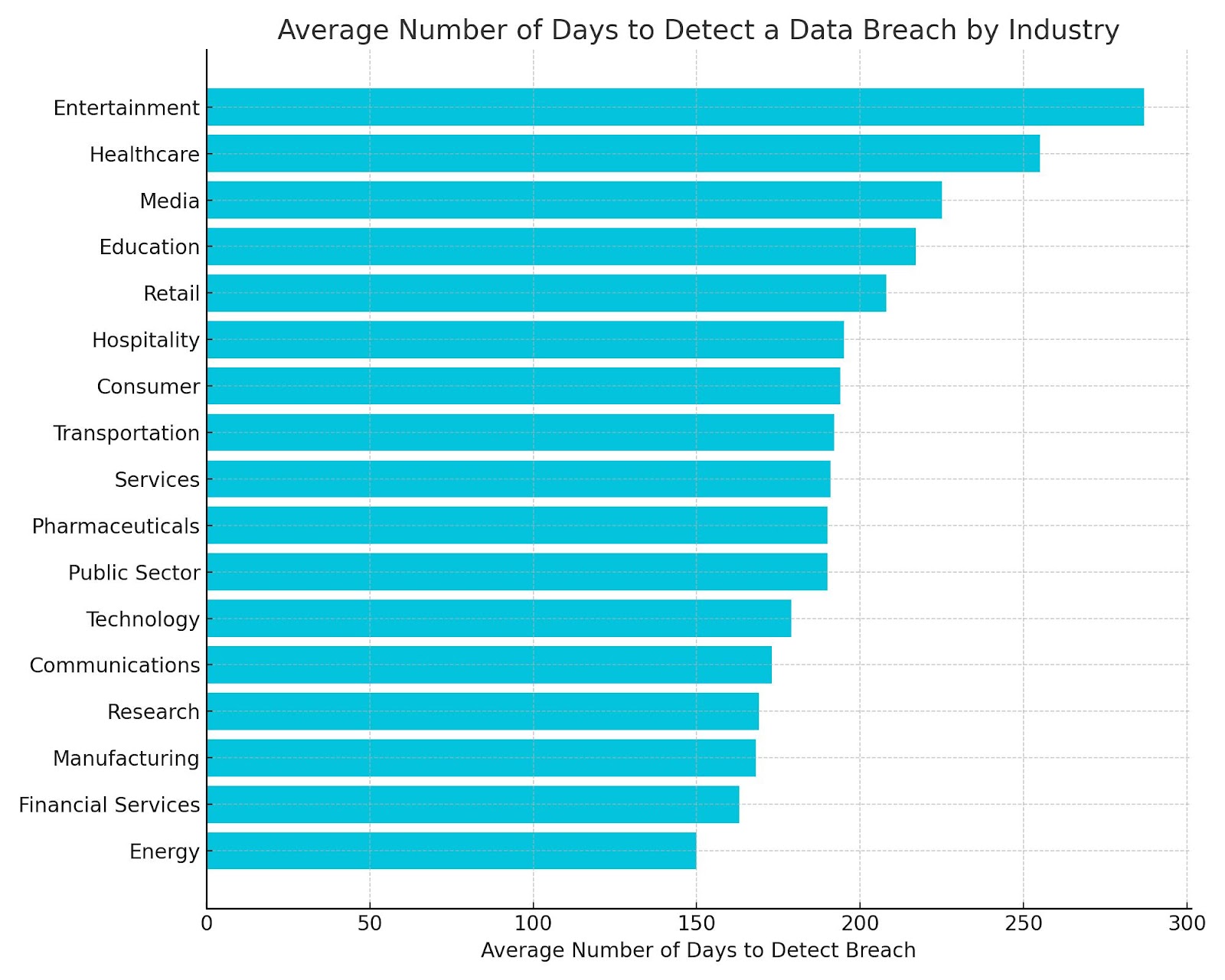
Average Number of Days to Detect a Data Breach by Industry

The entertainment industry faces the longest average response time to a cyber breach, with an average of 287 days to detect a breach, making it particularly vulnerable. Healthcare also stands out with a lengthy detection time of 255 days, reflecting the high stakes in an industry where sensitive personal data is at risk. 

Conversely, the energy sector is the most efficient in detecting breaches, with an average detection time of 150 days, highlighting the industry’s focus on swift incident response to potential threats.

Sectors handling large volumes of personal or sensitive data, like healthcare and entertainment, experience longer detection times, which could lead to significant consequences if not addressed promptly.

For industries like energy and financial services, faster detection times suggest a more proactive approach to incident response, which could serve as a model for other sectors aiming to enhance their breach detection capabilities.

OneCloud IT Solutions is Your Cybersecurity Solution

The average response time to a cyber breach in 2024 is a critical factor for businesses, with an average of 277 days needed to identify and contain a breach

Understanding and improving this response time is essential for businesses protecting against the continuously growing threat of cyber breaches. Companies must adopt more proactive cybersecurity strategies, focusing on quicker detection and more effective incident response techniques.

If you’re looking to strengthen your cybersecurity measures, OneCloud IT Solutions offers comprehensive cybersecurity services tailored to your needs. Explore more about our offerings at OneCloud IT Solutions, or get in touch with us to discuss how we can help safeguard your business.

Sources: IBM, Cyfor

How Many Businesses Use Microsoft 365 in 2024?

Microsoft 365 has become an essential tool for businesses worldwide, offering a comprehensive suite of applications that streamline operations and boost productivity. 

In 2024, its popularity continues to grow as companies of all sizes turn to this versatile and reliable cloud-based solution to meet their evolving needs.

But just how many businesses are using Microsoft 365 in 2024?

Key Statistics

  • Over 2 Million companies use Microsoft 365 worldwide
  • Roughly 150,000 Australian companies use Microsoft 365
  • Most popular apps include Word, Excel, Outlook, and PowerPoint

How Many Businesses Use Microsoft 365 in 2024?

Over 2 Million companies use Microsoft 365 worldwide.

This highlights the crucial role Microsoft 365 plays in global business operations. With its extensive suite of tools and secure cloud-based platform, companies depend on Microsoft 365 to maintain smooth and efficient operations. 

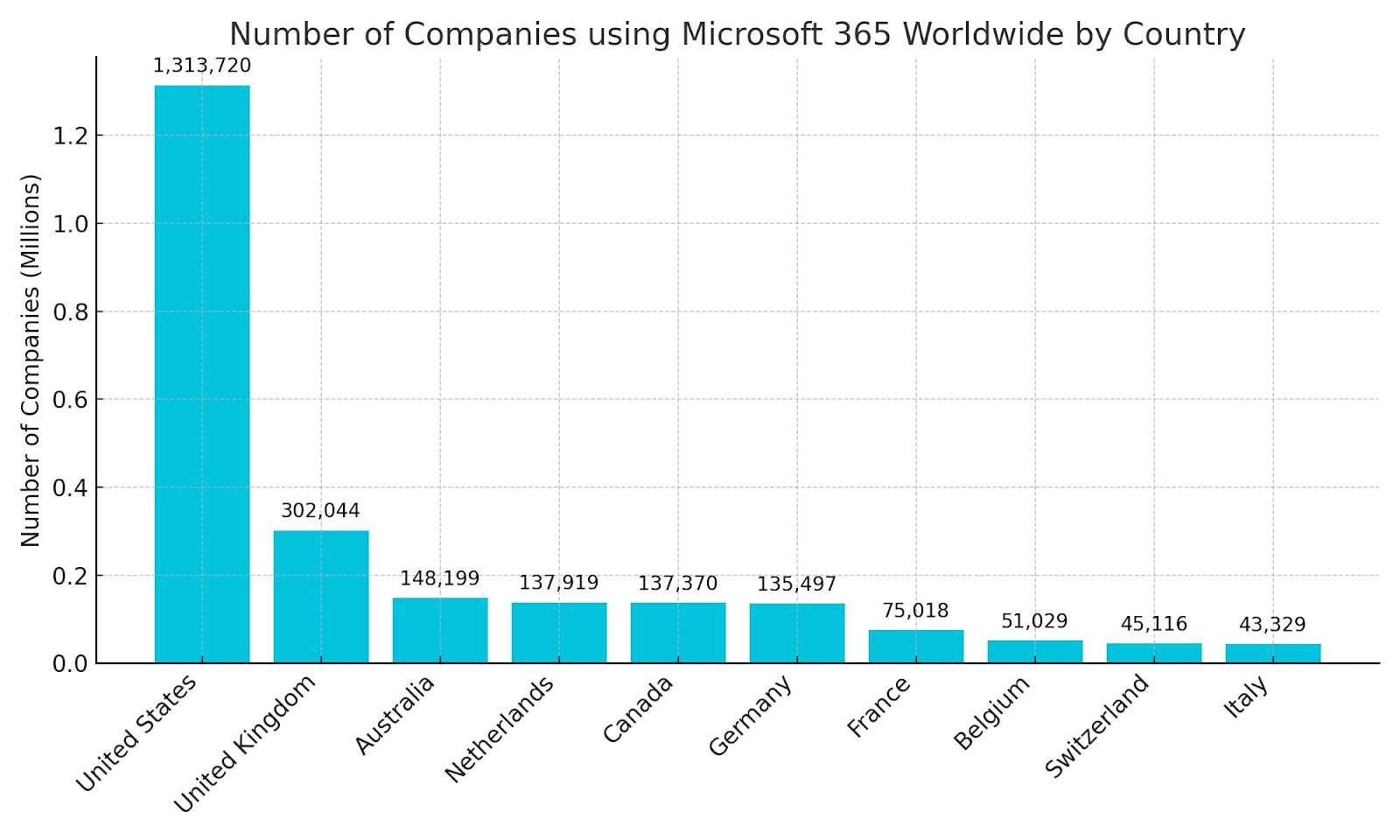
Number of Companies Using Microsoft 365 Worldwide by Country

The United States leads the way with over 1.3 million companies utilising Microsoft 365, reflecting its pervasive role in the American business landscape. The United Kingdom follows, with more than 300,000 companies integrating the platform into their operations, showcasing its vital presence in a region undergoing rapid digital transformation.

Australia, with nearly 150,000 companies using Microsoft 365, also emerges as a key market. The platform’s ability to support remote work and collaboration is particularly valuable in countries like Australia and Canada, where businesses often operate across vast distances.

Key Benefits of Using Microsoft 365 for Your Business

Seamless Collaboration

Microsoft 365 integrates tools like Teams, OneDrive, and SharePoint to enable real-time collaboration, ensuring that teams can work together efficiently from any location, reducing workflow friction and improving productivity.

Increased Productivity

With apps like Word, Excel, and Outlook, along with AI-driven features like PowerPoint Designer and Excel Insights, Microsoft 365 helps users work smarter and faster, allowing them to focus on high-value tasks.

Advanced Security

Microsoft 365 offers robust security measures, including multi-factor authentication and data loss prevention, to protect sensitive business data and ensure compliance with industry regulations.

Scalability and Flexibility 

The cloud-based nature of Microsoft 365 allows businesses to scale their services easily, adapting to changing needs while supporting remote work across various devices and locations.

Cost-Effective

Operating on a subscription model, Microsoft 365 provides a predictable and affordable solution that reduces IT infrastructure costs and eliminates the need for expensive software upgrades.

Streamline Your Business With Microsoft 365

The widespread use of Microsoft 365 by over 2 million companies globally highlights its essential role in today’s business environment. This blog explores its prevalence across various regions, with notable adoption in the United States, United Kingdom, and Australia.

Looking to improve your business operations with Microsoft 365? Explore our Microsoft Azure & 365 services to see how we can help your business. 

For more information, visit OneCloud IT Solutions or get in touch today to discuss your needs.
Source: Statista, Softlanding, Enterprise

How Much Money is Lost Globally Due to Cybercrime Annually?

The financial impact of cybercrime is a growing concern for businesses and individuals worldwide. Cybercrime is continually causing billions to be lost globally, underscoring the critical need for robust cybersecurity measures. As cyber threats continue to evolve, it is increasingly vital to stay ahead by adopting the latest security technologies and best practices.

Key Statistics

Here are key insights into the financial impact of cybercrime:

  • In 2023, $12.5 Billion was lost due to cybercrime
  • Cybercrime is forecasted to cost the global economy $10.5 trillion annually by 2025
  • 880,418 cybercrime complaints were lodged in 2023

How Much Money Is Lost Globally Due to Cybercrime Annually?

In 2023, $12.5 Billion was lost due to cybercrime.

The financial toll from cybercrime highlights the vulnerability of businesses and individuals to digital threats. Cybercrime often includes hacking, identity theft, ransomware attacks, and fraud, which can severely disrupt operations and lead to substantial financial losses. 

Cybercriminals target sectors that store large amounts of sensitive data and high-value financial information, such as the finance and healthcare industries. The increasing costs associated with cybercrime underscore the need for innovative security strategies to protect these critical assets.

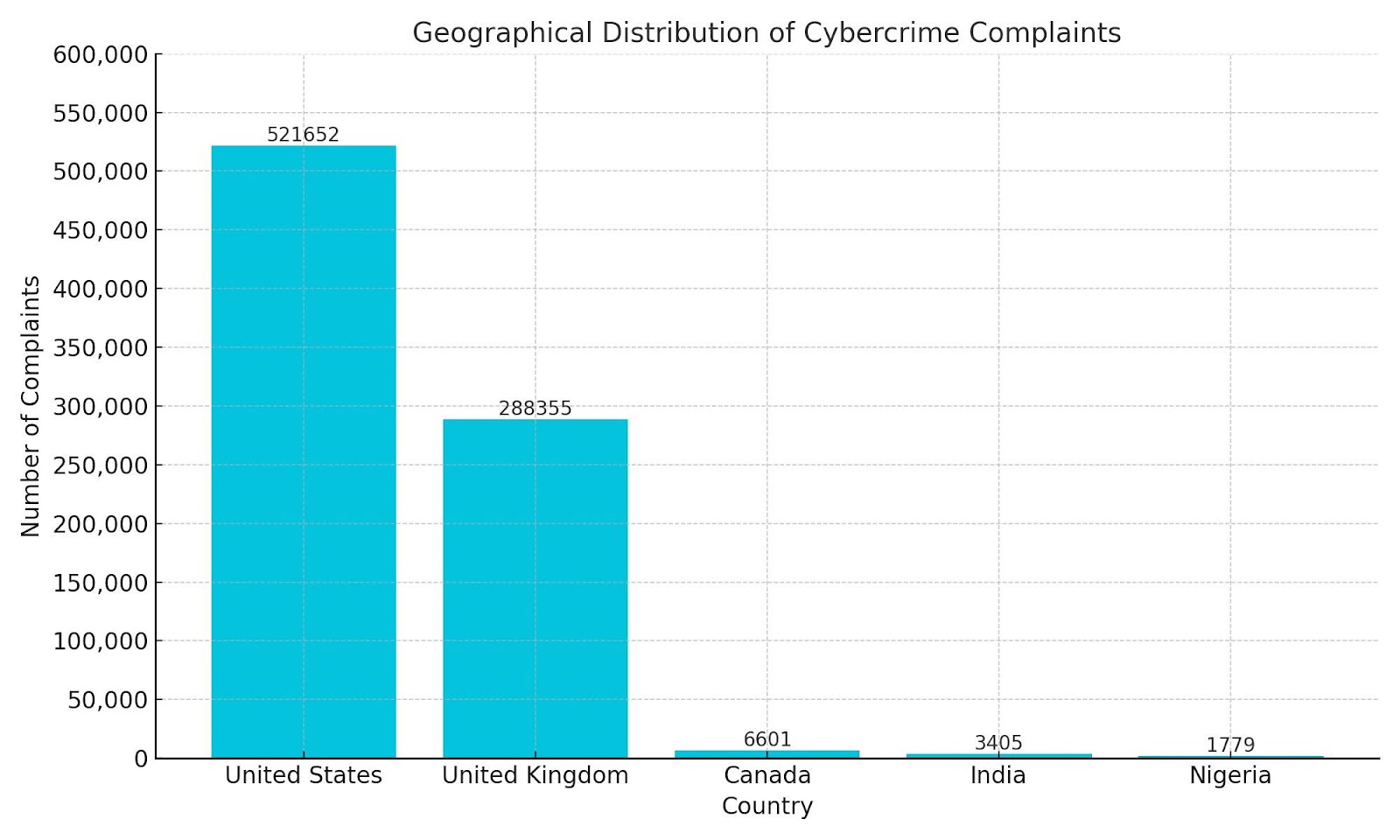
Geographical Distribution of Cybercrime Complaints

The geographical distribution of countries with the most cybercrime complaints reveals significant regional differences in reporting and victimisation. The United States leads with 521,652 complaints, indicating a high level of cybercrime activity or awareness. The United Kingdom follows with 288,355 complaints, showcasing similar challenges in combating cyber threats.

Canada’s 6,601 complaints suggest a lower incidence or perhaps underreporting of cybercrime incidents. In contrast, India and Nigeria report even fewer complaints, with 3,405 and 1,779 respectively.

The variation in complaints underlines the need for a global approach to tackle cybercrime, emphasising the importance of international cooperation and standardised reporting to effectively mitigate cyber threats.

Want to Protect Your Business from Cybercrime?

In 2023, cybercrime caused a global loss of $12.5 billion. With this figure rising annually, the urgency to address cyber threats is intensifying. As cybercriminals continuously evolve, the demand for advanced cybersecurity measures becomes increasingly critical.

For comprehensive cybersecurity solutions, explore our cybersecurity services. To learn more about how OneCloud IT Solutions can safeguard your business, visit OneCloud IT Solutions. If you have any questions or need assistance, get in touch with us today.

Sources: Statista, Biosestate

How Many Phishing Emails Are Sent Daily in 2024?

Phishing emails remain a significant threat, with cybercriminals sending billions of deceptive messages daily. Understanding the volume of phishing emails and their impact on organisations is crucial for enhancing cybersecurity and spam email protection. This blog will delve into the deceptive nature of phishing emails, offering insights into the prevalence of these attacks and their effects on various industries.

Key Statistics

  • Approximately 3.4 billion phishing emails are sent daily by cybercriminals
  • 92% of Australian organisations suffered a successful phishing attack
  • 36% of all data breaches involve phishing
  • 1 in 4,200 emails sent is a phishing scam

How Many Phishing Emails Are Sent Daily in 2024?

Approximately 3.4 billion phishing emails are sent daily by cybercriminals.

Businesses and individuals alike must be aware of the ever-growing threat of phishing emails sent by cybercriminals. These emails often appear as legitimate communications to trick recipients into revealing sensitive information or downloading malicious software. 

Phishing emails can lead to significant data breaches and financial losses, making awareness and prevention essential. Enhancing spam filters and educating employees on recognising phishing attempts are critical steps in mitigating this pervasive issue.

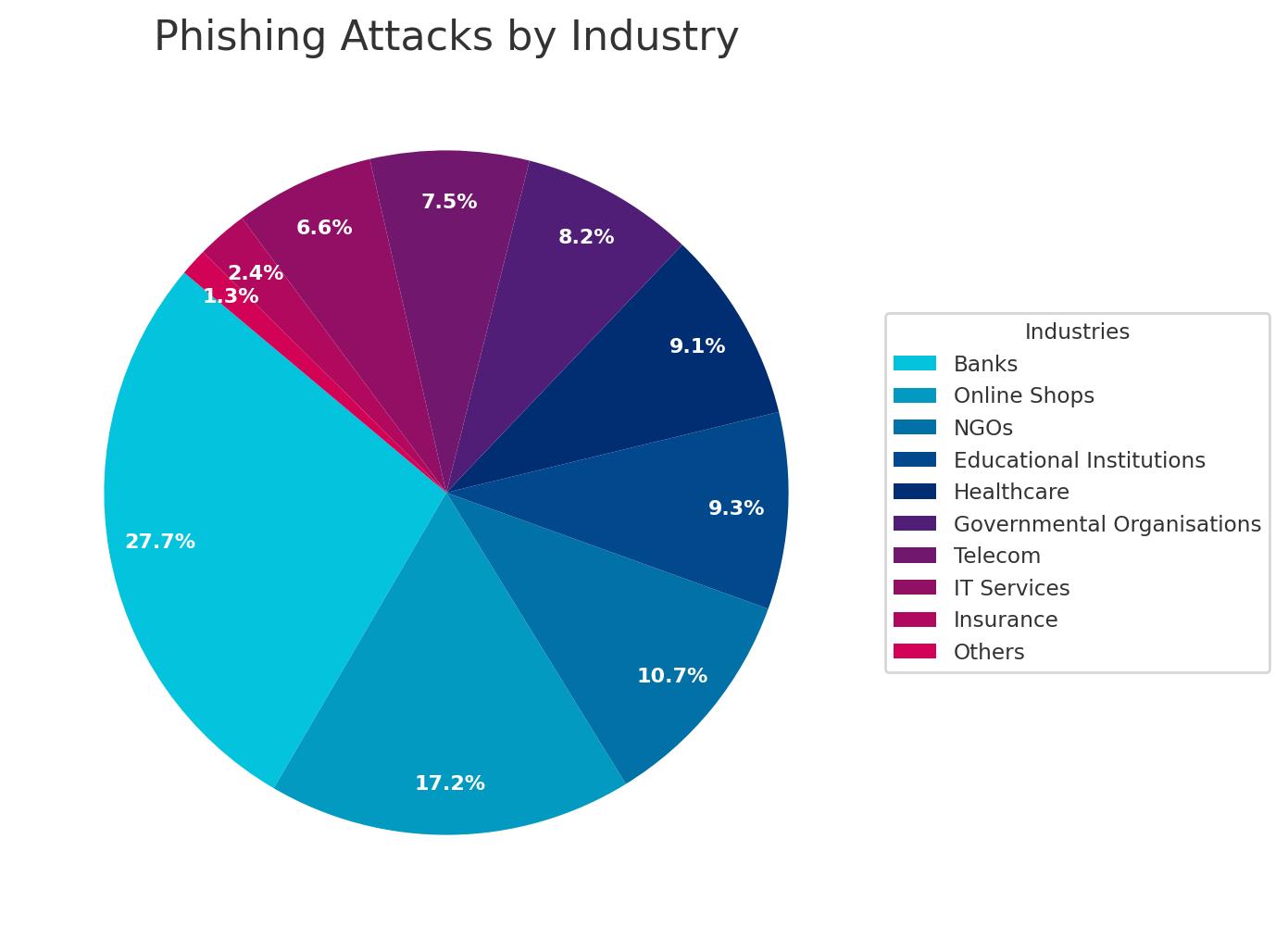
Phishing Attacks by Industry

Banks are the primary targets for phishing attacks, accounting for 27.7% of all incidents. This aligns with the main intent of cybercriminals, who send phishing emails primarily for monetary gain by accessing sensitive financial information. Online shops are also significantly targeted, with 17.2% of attacks aimed at e-commerce platforms, highlighting the need for robust security measures in the retail sector.

Non-governmental organisations (NGOs) and educational institutions are other notable targets, with 10.7% and 9.3% of attacks respectively. These sectors often hold valuable personal and financial data, making them attractive to attackers. Healthcare and governmental organisations, representing 9.1% and 8.2% of phishing incidents, also need to prioritise cybersecurity to protect sensitive data.

Need Help Protecting Your Business from Cybercriminals?

Phishing emails continue to be a pervasive threat, with approximately 3.4 billion sent daily by cybercriminals. The illustrates the widespread impact of these attacks across various industries, emphasising the need for strong cybersecurity measures.

To protect your business from phishing and other cyber threats, explore our email spam protection and cyber security services. For more information about how OneCloud IT Solutions can help secure your organisation, visit OneCloud IT Solutions. Get in touch with our team today to enhance your cybersecurity strategy.

Source: Station X, Verizon, Astra

How Many New Malware Variants Are Detected Daily in 2024?

Understanding the scale of new malware variants is crucial for businesses and individuals alike as cyber threats continue to evolve. In 2024, the sheer number of new malware variants detected daily highlights the ongoing challenge of maintaining cybersecurity. Staying informed of this is essential for staying prepared against potential cyberattacks.

Key Statistics

  • 560,000 new pieces of malware are detected daily
  • 1 billion malware programs currently exist
  • In 2022, 5.5 billion malware attacks were deployed

How Many New Malware Variants Are Detected Daily?

560,000 new pieces of malware are detected daily.

This underscores the rapid pace at which cyber threats are evolving. Such a high volume of new malware variants daily highlights the critical need for robust cybersecurity measures. Awareness of cybersecurity threats enables businesses and individuals to take proactive measures to strengthen their security protocols.

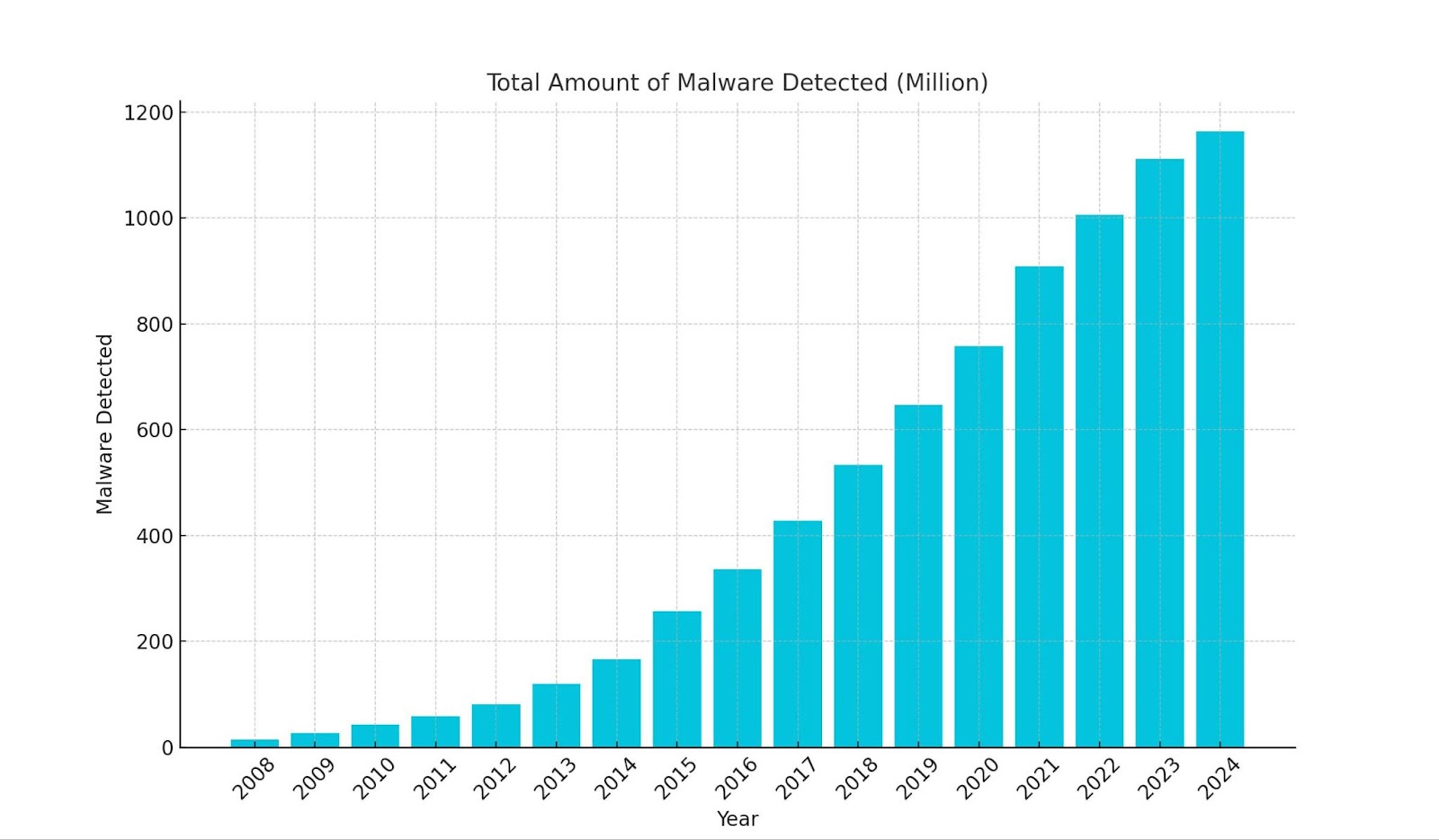
Total Amount of Malware Detected per Year

There has been a continuous rise in the total amount of malware detected each year, reflecting the increasing sophistication and frequency of cyber threats. From a mere 15 million in 2008, the number surged to over 1.1 billion by 2023, reaching an estimated 1.163 billion in 2024. This exponential growth highlights the urgent need for enhanced cybersecurity measures.

The steepest increases were observed between 2014 and 2015, where the total amount of malware nearly doubled in each period. This surge can be attributed to rapid technological advancements and the proliferation of internet-connected devices, which have provided cybercriminals with more targets.

As new vulnerabilities are discovered and exploited, the volume of malware continues to expand, making it imperative for organisations to stay ahead with proactive and comprehensive security strategies.

Need Assistance With Your Cyber Security?

As malware threats continue to grow in complexity, staying ahead of potential risks has never been more crucial. In 2024, a staggering 560,000 new pieces of malware are detected daily, so there’s no better time to protect your business against malware with our comprehensive cyber security services

For more information about our offerings, visit OneCloud IT Solutions. Need personalised assistance? Get in touch with our team today.

Sources: Astra, Av-Atlas, Statista