What is the Average Cost of a Data Breach in 2024?

The financial impact of data breaches has become a critical issue for businesses. Understanding the financial impact emphasises the need for companies to implement robust security measures. The average cost of a data breach in Australia is a staggering $4.03 million, which continues to rise annually. As data security becomes increasingly paramount, staying informed about the latest statistics and trends is essential.

Key Statistics

Here are key insights into the average cost of a data breach for a company:

  • In 2023, the average cost of a data breach in Australia is $4.03 million 
  • The costs are expected to reach $5 million within the next few years
  • 82% of breaches occurred in the cloud environment

What is the Average Cost of a Data Breach?

In 2023, the average cost of a data breach in Australia is $4.03 million, with costs expected to reach $5 million within the next few years. This shows the significant financial risk businesses face in the event of a data breach. Such high costs underscore the importance of investing in robust cybersecurity measures. 

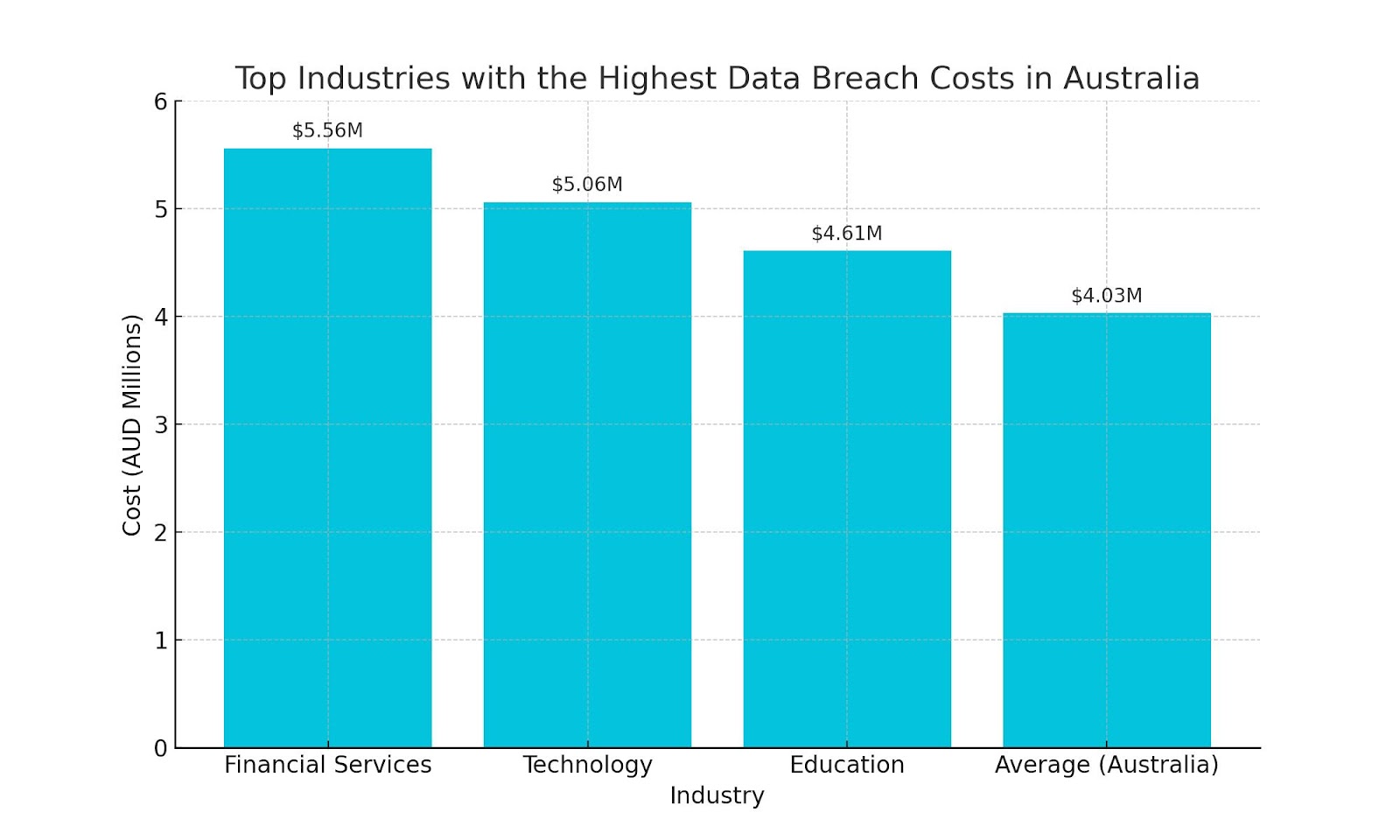
Top Industries With The Highest Data Breach Costs in Australia

Financial Services tops the list with an average breach cost of $5.56 million, reflecting the high value and sensitivity of financial data. 

The Technology industry follows closely, with an average breach cost of $5.06 million. This highlights the industry’s vulnerability to cyberattacks, given its vast digital footprint and the critical role technology plays in daily operations across various sectors.

Education, with an average breach cost of $4.61 million, also faces substantial financial repercussions from data breaches. The increasing digitisation of educational resources and student information systems makes this sector a lucrative target for cybercriminals.

Looking For Help With Cyber Security??

In summary, the average cost of a data breach for a company in Australia is $4.03 million, highlighting the significant financial risk businesses face. Understanding these costs can help justify investment in cybersecurity measures.

For comprehensive IT support and security solutions, visit OneCloud IT Solutions. Explore our Cyber Security services to safeguard your business. Need assistance? Get in touch today to enhance your cybersecurity posture.

Source: ACSM, UPGuard

How Many Businesses Have Experienced a Ransomware Attack in 2024?

Ransomware attacks continue to pose a significant threat to businesses globally. As cybercriminals become more sophisticated, the number of organisations falling victim to these attacks has risen sharply. In 2024, understanding the prevalence and impact of ransomware attacks is crucial for businesses aiming to bolster their cybersecurity measures.

Key Statistics

  • 54% of Australian organisations have been hit with ransomware attacks in 2024 (59% globally).
  • The average ransomware demand made towards Australian organisations is USD 6.8 million.
  • 46% of global organisations with revenue less than USD 50 million received a seven-figure ransom demand in the last year.
  • Ransomware incidents cost the Australian economy as much as $2.59 billion annually.

How Many Businesses Have Experienced a Ransomware Attack in 2024?

54% of Australian organisations have been hit with ransomware attacks in 2024 (59% globally).

This demonstrates the widespread nature of ransomware threats and highlights the urgent need for enhanced cybersecurity measures. Australian businesses should prioritise their defences to protect against these costly and disruptive attacks. The high percentage of affected organisations underscores the importance of being prepared and proactive in addressing ransomware vulnerabilities.

Number of Ransomware Attacks Across Australian Sectors

In 2022, the healthcare and public health sector experienced the highest number of ransomware attacks, with a total of 210 incidents. This highlights the vulnerability of the healthcare sector, which is often targeted due to the sensitive nature of its data and the critical services it provides.

The manufacturing sector also faced significant challenges, recording 157 ransomware attacks. This sector’s susceptibility can be attributed to its essential role in the supply chain and the potential for substantial disruption when its operations are compromised.

Government facilities were not spared either, with 115 attacks reported. These incidents highlight the persistent threat to public sector organisations, which must continually adapt and strengthen their cybersecurity measures to safeguard public infrastructure and services. Overall, these statistics reveal a widespread threat landscape that spans multiple critical sectors.

Contact OneCloud IT Solutions

In 2024, 54% of Australian organisations have been hit with ransomware attacks, reflecting a significant cybersecurity threat. The impact across various sectors, particularly healthcare and manufacturing, underscores the need for robust protection measures.

For comprehensive network security solutions, explore our Network Security services. At OneCloud IT Solutions, we are committed to safeguarding your business. Get in touch with us today to enhance your cybersecurity defences.

Sources: OAIC, ACSM, Drata

How Many Spam Emails Are Sent Per Day in 2024?

The volume of spam emails sent globally has continued to rise, impacting businesses and individuals alike. Understanding the scale of this issue is crucial for developing effective strategies to combat spam and enhance cybersecurity measures. In this blog, we will delve into the staggering numbers behind spam email statistics for 2024.

Key Statistics

  • 162 billion spam emails are sent every day
  • Spam messages accounted for more than 46.8% of email traffic.
  • Phishing is the most common form of cybercrime, with an estimated 3.4 billion spam emails sent every day

How Many Spam Emails Are Sent Per Day in 2024?

In 2024, an astounding 162 billion spam emails are sent every day. This staggering number illustrates the pervasive nature of spam and its impact on digital communications. Such high volumes of spam necessitate advanced filtering and security measures to protect users from potential threats. Understanding the scale of spam emails is essential for developing effective anti-spam strategies and improving overall email security.

Which Country Sends the Most Spam Emails?

COUNTRYNUMBER OF SPAM EMAILS SENT PER DAY (BILLIONS)
United States8
France7.3
Germany7.1
Russia7.1
Canada7
China7
Bulgaria6.9
Romania6.8
United Kingdom6.7
Japan6.5

The United States leads the list, sending 8 billion spam emails per day. This high volume underscores the need for stringent email security measures to protect against spam and potential cyber threats originating from the US.

European countries like France, Germany, and Russia also contribute significantly to global spam, each sending over 7 billion spam emails daily. This highlights the widespread nature of the spam problem across different regions.

Interestingly, countries such as Bulgaria and Romania, which may not be as frequently associated with high levels of spam activity, are notable contributors, sending 6.9 billion and 6.8 billion spam emails per day, respectively. This data indicates that spam is a global issue, necessitating international cooperation and advanced technological solutions to mitigate its impact.

Contact OneCloud IT Solutions

The sheer volume of spam emails, with 162 billion sent every day in 2024, highlights the ongoing challenge of managing and mitigating spam. Understanding these statistics is crucial for developing effective email security strategies.

To protect your business from spam emails, explore our Email Spam Protection solutions. For more information on our services, visit OneCloud IT Solutions. If you have any questions or need assistance, get in touch with us today.

Sources: Emailtooltester, Mailmodo, Block Sender

IT Support for Law Firms: The 6 Main Requirements

Every industry has its unique technology requirements and considerations, and the legal field is no different. As such, IT support for law firms needs to be tailored to the specific challenges legal businesses face. 

Here we explore the 6 main IT considerations that law firms need to address. We also share our advice on what to look for when choosing an IT service provider to support your firm.

What IT support does your law firm require?

Given the sensitive nature of your work, trust and reputation are particularly crucial to the success of your law firm. 

Acknowledging this, your top IT priority should be ensuring your important systems and data are sufficiently protected against potential attacks. You should also be focused on moving away from outdated systems and processes, and toward more efficient and secure solutions.

The top 6 IT challenges for law firms

How your firm operates, as well as the environment it operates in, creates several important considerations for your IT support. Significant expertise and careful planning are required when developing support services that are tailored to the exact needs of your firm.

Managing cybersecurity

Cybersecurity is a big challenge for every small business, but law firms need to be particularly conscious of ensuring they have sufficient protections in place. Cybercriminals understand that, while most firms collect and hold highly sensitive data, their security measures tend to be weaker or outdated. 

This makes them high-value targets, and some experts believe cyberattacks on Australian law firms are now a daily occurrence.

There are a range of measures your firm should have in place to prevent breaches, or at least minimise their damage. This includes a suite of technical interventions, like managing access through passwords and other controls, and keeping your applications and anti-virus software updated. 

It also includes regular education and awareness activities, designed to equip your team with the knowledge and skills to identify and prevent potential attacks.

Regulatory compliance

Working within the legal field, you understand better than most how important it is to meet your regulatory obligations!

More than just attracting hefty fines, breaching your legal requirements can cause irreparable damage to your firm’s reputation. As many regulations are designed to protect your business and clients, breaches can also leave you exposed to increased operational risk.

From an IT perspective, the Australian Privacy Principles are particularly relevant, as they outline the data security standards your business needs to meet. 

While these are quite stringent, they are also principles-based, which means you can design information management practices that suit your business. You can also choose the systems and processes that best fit your requirements, which is something an experienced IT service provider can advise on.

Digitisation of records

You collect a significant amount of data on each client, and it generally needs to be held for several years. 

Traditionally, this has been in the form of physical documents, but there is an increasing push for firms to go digital. Digitising documentation can increase both the security and availability of the information, but it must be managed carefully and supported by the right tools.

Choosing an IT partner with significant experience managing digitisation and migration projects should help streamline this process. They will be able to advise on ways to avoid confusion and double-ups during the transition period

They will also be able to implement an integrated document management system to make data storing and searching as easy as possible.

Legacy software and systems

It is highly likely that physical records are not the only outdated approach your business is hanging onto. 

Law firms are particularly prone to persisting with legacy software and systems, regardless of how difficult they are to use. Often, such systems are also unsupported, which means they are more susceptible to cyberattacks and less compatible with new tools and technologies.

With replacement the only real option, many law firms are choosing to take the leap and migrate to the Cloud. In addition to improving system and data accessibility, this increases security and centralises the management of maintenance and updates. 

The initial investment required to implement the new tools and processes should also be offset by the ongoing cost savings and reduced operational risk.

Supporting remote working

Research suggests that, since the global pandemic, small law firms are embracing work-from-home arrangements at much higher rates. Unfortunately, remote working does present some IT challenges.

Most significantly, your systems need to be set up to allow team members to remotely access everything they need to do their job. Specialist tools may also be required to support communication and encourage collaboration when your team is geographically dispersed. Additional measures will also be required to ensure that your team members are the only ones who can remotely access your important systems and data.

Minimising downtime

When you are working within strict time limits, the last thing you need is to be held up by system outages. This is particularly true in the legal field, where missing a deadline can have significant consequences – both financially and legally. Delays due to technical issues are also an especially bad look when you are billing by the hour.

Acknowledging this, system stability should be a major consideration when choosing and implementing new tools and technologies. Regular system monitoring and maintenance should also be carried out to minimise the risk of unplanned outages.

Need help meeting your firm’s IT support requirements?

For more information on IT in the legal field, or to discuss your business’s requirements, contact the OneCloud team today

We have extensive experience providing IT support for law firms and can make sure your systems are secure, efficient, and compliant. We also offer a wide range of managed IT services and can tailor a package to suit your specific needs.

8 Signs It’s Time to Switch IT Provider

A good IT service provider will understand the unique needs of your business and be able to help support its growth. 

More than simply keeping your systems running, they will maintain security, drive the adoption of new technology, and monitor performance. They will also help you to keep your team engaged, and proactively recommend process and system improvements.

However, as your business grows, your needs will often change, potentially putting strain on a previously great relationship. As a result, you may need to switch IT providers to ensure your support requirements continue to be met. 

You also need to watch out for the signs that your current arrangements are no longer working!

How do you know it’s time to switch IT providers?

As a general rule, if you’re asking whether it’s time to move on, you already know the answer.

Trust is crucial to an effective outsourcing arrangement so if you’re starting to question whether you can rely on your IT provider, it’s probably time to switch. And it’s best to be proactive about this decision, as the situation will usually only get worse the longer you leave it.

8 signs it’s time to switch

Here are the telltale signs that your current IT provider is no longer the right choice for your business.

  1. They don’t deliver

While timelines can change, you should be confident your IT provider will always meet their commitments. If they consistently fail to do this, it’s time to move on.

As you’re relying on them to keep your systems stable and secure, you need to be sure your IT provider is on top of things. 

In particular, you should watch out for ongoing system outages, technical issues, and project delays. These can significantly impact your productivity and damage your business’s reputation and are clear signs your provider isn’t doing their job.

  1. They are hard to get hold of

IT issues are often time-sensitive, so it’s important that you can access the support you need, when you need it. If this is not the case, you should consider switching IT provider.

As you are the client, you shouldn’t have to chase your IT provider for progress updates and other important information. In fact, the best providers build regular check-ins into their service approach and ensure you always have a way to contact them. 

In other words, you should feel like the prize!

Your provider should also commit to standard response times for both emergency and non-urgent requests as part of their Service Level Agreement.

  1. The value they provide is no longer obvious

One of the biggest advantages of managed IT services is that they should help maximise your return on investment. If you feel you aren’t getting your money’s worth from their service, it could be worth looking for a new provider.

Most IT support services will start strong, providing a raft of recommendations and making changes that have an immediate impact. However, once they pick all of the low-hanging fruit, some providers lose steam and shift focus to easier maintenance activities. 

While these are important, if your provider is only managing daily tasks, they are not supporting your business’s ongoing growth.

  1. You keep having IT issues

Responding to unplanned outages, performance issues, data breaches, and other common problems, is the bread-and-butter of IT support services. If the same issues keep happening, your provider is clearly not doing enough to prevent them, and it’s time to switch.

When you experience a serious IT issue, the top priority is getting your business back up and running. Once this is done, your provider should assess the cause of the problem, and implement measures to stop it from recurring. 

They should also monitor system performance and stability to help identify potential issues early, and proactively recommend ways to mitigate key risks.

By being capable of both reacting and preventing – you’ll know you have a good IT provider when IT problems are rare and easily dealt with. 

  1. Their advice no longer suits your business

Your service provider should engage with you regularly, taking the time to understand how your business operates and how your requirements are evolving. If they don’t, their advice won’t reflect your actual needs, and you should start looking for a new IT partner.

IT solutions are not one-size-fits-all, and the right approach for you will depend on a range of factors. Your provider should consider all of these for you and recommend the best options for your specific situation. 

If they keep pushing services that aren’t right for you, they either don’t understand your business or aren’t working in your best interest.

  1. They don’t share knowledge

Your team members play a crucial role in keeping your systems and data safe, and your IT provider should support their ongoing engagement and education. If they don’t, look for a service that will.

Regular training is required to ensure your team members understand and actively protect your business against potential cybersecurity attacks. Acknowledging how crucial this is, good IT providers will support the planning, and often delivery, of training activities. They will also provide updates on important cybersecurity trends and information on emerging threats.

  1. They keep pushing you to spend more

As your business grows, your provider may recommend additional support and new services, but this should be driven by your evolving requirements. If it’s not, and they are constantly trying to upsell you, it might be time to end their engagement.

Ongoing investment is required to keep your systems optimised and secure, and costs may increase over time. However, a good provider will help control your IT costs through targeted investment and strategic adoption of new technologies. They will not continually increase your fees or constantly recommend spending more on new systems and projects.

  1. You have outgrown them

Building on the above, as your business grows and your support needs increase, your provider should be able to easily scale their service to suit. If they can’t, you should switch to an IT provider who can.

The level of IT support your business requires will depend on the size and nature of your operations. For example,  how small businesses approach cybersecurity will be different to the measures larger organisations need to have in place. As such, as your business grows, the support you need changes, and your provider should adjust their service accordingly.

Ready to make the switch IT providers?

Choosing to change providers can be difficult, particularly if you have worked together for a while. Beyond the awkward conversations that need to be had, technical changes may be required to transition to a new service. However, this short-term inconvenience is more than outweighed by the long-term benefits.

If you have decided that it’s time to switch IT provider, give OneCloud a call

We are committed to delivering high-quality, reliable support and can tailor our service to suit your requirements. We also understand the transition process and can make it as smooth as possible, keeping downtime to a minimum.

Cybersecurity checklists: Why your business needs one

Keeping your business safe from cyberattacks requires the implementation of a range of important processes, systems, and controls. 

It also requires a coordinated effort to ensure these measures are maintained and built on over time. 

And you need to keep an eye out for new threats and ensure additional protections are put in place as required.

Sounds like a lot, right!

Given the scale and diversity of these activities, it can be difficult to keep track of them all. This is where a cybersecurity checklist can help, providing a snapshot of the work your business has already done.

With a cybersecurity checklist, the tool helps you assess your cybersecurity health without you needing to keep track of everything in your head!

What is a cybersecurity checklist?

Put simply, a cybersecurity checklist is a list of all the things a business should be doing to protect itself against cyberattacks. It is used to assess the strengths and weaknesses of a business’s existing processes and systems. It also supports strategic planning by highlighting the key areas requiring further focus and investment.

The importance of regular assessment

As the rate of cybercrime increases and cyberattacks become more sophisticated, business cybersecurity standards need to keep pace. This is particularly true for small businesses, which usually have weaker protections and are increasingly being targeted by cybercriminals.

As such, implementing and maintaining appropriate cybersecurity measures requires an ongoing commitment. Regular assessment of existing arrangements is a crucial part of this, allowing progress to be tracked over time. When done well, it also provides a framework for forward planning and can help provide a return on investment.

It is important to note here that any assessment tool, like a cybersecurity checklist, only identifies potential areas for improvement. Addressing these gaps will usually require additional effort and further investment, as well as the support of experienced cybersecurity professionals.

Features of a good cybersecurity checklist

Cybersecurity checklists come in a wide variety of formats and sizes. Some are extremely detailed and highly tailored to the unique considerations of a specific business or industry. Others are much simpler and cover the core activities that will benefit any business.

Whatever form they take, the best checklists share a few key characteristics.

Based on best practice

Regardless of the level of detail provided, a good cybersecurity checklist will enable you to measure your business against current industry standards. 

As part of this, it will highlight the greatest areas of concern, based on recent trends in cyberattacks. That means, by filling it out, you’ll know how well your business is protected.

Importantly, your checklist should be prepared by IT professionals with significant experience in the planning and implementation of cybersecurity measures. This should mean it is focused on practical interventions that are proven to deliver real protection against potential attacks.

Reflects the full range of security requirements

As there are multiple ways for cybercriminals to gain access to your systems and data, a robust security approach involves a range of different measures. 

Some of these will be technical solutions applied to the devices, applications, and systems you use regularly. Others will be administrative controls that are designed to minimise the risk and potential impact of an attack.

Acknowledging this, a good cybersecurity checklist will cover:

While the subject matter may be technical and complex, the assessment tool does not need to be. 

Often the best checklists are 1-2 pages, making them easy to complete while still providing enough of an overview to provide insights. 

In fact, an effective cybersecurity checklist should be simple enough that it can be completed by people who do not have an IT background. This is particularly important for small businesses, which often do not have experienced IT professionals on staff.

As part of this, the checklist should be structured logically, guiding the person completing it through the different steps of the assessment process. Response requirements should be kept as simple as possible, like ticking off the measures that are in place. The need for further detail should be kept to a minimum, as this can be gathered during any follow-up activities required.

Checklists designed to support small businesses will often also indicate what can be easily managed in-house, and what will require professional support.

Free to access

Most IT support services will have their own suite of tools designed to help clients assess and improve their systems and processes. This will usually include a cybersecurity checklist, though some consultants will charge you to access this document. Others will include access as part of broader cybersecurity service packages, but will still require you to pay to complete the assessment.

As there are a variety of high-quality resources available online, for free, there is no reason to pay for a checklist.

Using a free tool allows you to complete your assessment, and form your own opinion about the support you require. You can then have more informed discussions with potential consultants, working with them to tailor a package to your specific requirements.

Use our free cybersecurity checklist

15 Ways to Protect Your Business from a Cyberattack! is our free 1-page cybersecurity assessment checklist.

This free, easy-to-use self-diagnostic tool covers the 15 things every business should be doing to keep their valuable systems and data safe. Created by our cybersecurity experts, it allows you to quickly assess your performance against industry standards and identify any gaps you need to address.

We hope you find it useful. If you find your cybersecurity lacking, please don’t hesitate to get in touch so we can help you implement a robust cybersecurity plan.

Securing Your Cyber Infrastructure: The Importance of IT Server Protection

Over the last few years, the frequency and sophistication of cyberattacks have increased significantly. A much wider range of organisations have also been victims, with operations of varying sizes and focuses now being targeted.

This has made it even more crucial for every business to have robust IT server protection measures in place.

Acknowledging this, we want to take a closer look at what IT server protection is and the benefits it can provide for your business.

As part of this, we will explore how these measures differ from other IT security efforts, and how they support the overall health of your network. We will also share our advice on the best ways to secure your servers and minimise the risk of serious attacks.

Why does my server need protection?

An unprotected server is like the Holy Grail to cybercriminals, who will actively look for this weakness and exploit it to:

  • Access sensitive data, like client contact details and financial information
  • Infect your server with malware, which can be used to cause serious damage to your systems or steal sensitive information
  • Hijack your website and other key administrative systems, and potentially demand a ransom be paid before they restore access

Having proper server protection in place helps minimise this risk, keeping your business, and your client’s data, safe.

As recent events have shown, failing to do this can cause serious damage to your business’s reputation. It can also create legal problems, as Australian businesses are now required to keep client information safe through strict data management and protection measures.

The role of IT server protection

For most businesses, a secure server is an essential component of a healthy IT landscape. It means you are protected against malware, data breaches, unauthorised access, and other serious threats. It can also help you to optimise the availability, integrity, and confidentiality of your key systems.

It is worth noting here that there is a subtle, but important, difference between server security and cybersecurity.

While these terms are often used interchangeably, cybersecurity is a broader term that covers any measures designed to help prevent cyberattacks. IT server protections are a subset of these activities, specifically focused on keeping your server infrastructure secure.

It is also important to acknowledge that IT server protections must be supported by a range of other critical security measures. These include:

  • Sufficient email protections, to help strengthen and defend the primary entry point for most hackers and cybercriminals.
  • Comprehensive cybersecurity training, to help make sure your team members are aware of the biggest threats to your business and how to avoid them.
  • Robust business continuity plans, to help identify and mitigate key risks and provide a structured, strategic approach to responding to emergencies.

This list is far from exhaustive, and the exact protections you require will depend on the nature and scope of your business. The Australian Signals Directorate’s Essential Eight Maturity Model provides a more comprehensive approach to improving your business’s overall cybersecurity.

8 measures to keep your servers secure

If you are worried about the security of your servers or would like to implement additional protections, there are a few simple measures you should consider.

1. Keeping your networks private

Open networks have limited restrictions on who can access them, leaving them susceptible to all kinds of attacks.

By contrast, a private network creates an isolated environment that can only be accessed by those directly connected to it. Similarly, a virtual private network (VPN) creates a secure connection that allows you to safely access remote servers.

2. Disabling your admin user

Every server is set up with a root user role that has unrestricted access and can execute any command. These are a key target for cybercriminals as, if they can hack this role, they will have complete control over the server. To negate this, it is widely recommended that you disable this role when setting up your server.

3. Tightening your password requirements

Depending on their quality, passwords can be either your greatest protection against unauthorised access or one of your business’s biggest vulnerabilities. Where passwords are required, make sure they have to:

  • Be a minimum length (e.g. 8+ characters)
  • Include a range of different character types (numbers, upper and lower case letters, etc.)
  • Be updated regularly (e.g. they expire after 1 month)
  • Use a password manager

4. Implementing two-factor authentication

To further minimise the risk of unauthorised access, make sure your user verification process has at least two steps. This reinforces password controls by also requiring the entry of a security key or completion of a biometric scan (e.g. fingerprint) as part of the login process.

5. Setting up a firewall

A firewall adds another layer of protection against unauthorised access by limiting the systems and services a user can connect to or access. There are several different types of firewalls, which vary in structure and filtering method.

The right one for your business will depend on your budget and operating requirements.

6. Regularly updating your software

To keep your systems running as efficiently as possible, make sure you implement new updates as they become available.

These usually include patches and fixes for known issues or weaknesses, as well as operational improvements and new functionality. While updates can usually be automated, depending on the specific software, testing may be required before implementation to ensure usability will not be impacted.

Exploiting known vulnerabilities in software is one of the most common ways hackers infiltrate systems, so this is an incredibly simple measure to take that has a huge impact on your security.

7. Ensuring you have a back-up

While the above measures should help you prevent an attack, you still need to be prepared for the worst. Having a comprehensive backup of your systems and data will help minimise the impact of a successful attack and speed up recovery if something does go wrong.

This should be updated regularly and stored securely, either off-site or in the cloud.

8. Regular compliance checks

Regular compliance checks are like the health checkups for your server security. Imagine having a fancy security system, but never testing if it actually works!

In the ever-evolving digital world, your security needs to remain adept enough to combat the ever-growing capabilities of cybercriminals.

Don’t wait until it’s too late to protect your IT server

For information or assistance on improving your IT server protection, as well as meeting all your other cybersecurity needs, contact OneCloud IT Solutions today.

How Cyber Security Training for Employees Protects Your Business

When considering how to improve your business’s cyber security, your mind most likely goes straight to technological interventions.

From application controls and configurations to multi-factor authentication and restricting administration privileges, there are a range of measures that can help harden your defences. However, the most effective and cost-efficient step you can take is usually something a little softer – cyber security training for employees.

It doesn’t matter how robust your systems are if your team members aren’t aware of, and actively protecting you against, potential cyber threats.

This is particularly true if your employees regularly work remotely or use cloud-based solutions, as this increases your vulnerability to attacks.

But by delivering structured cyber security training for employees, you can turn one of your system’s biggest weaknesses into one of its greatest strengths.

How cyber-savvy are your team members?

In their 2023 Data Breach Investigations Report, global telecoms powerhouse, Verizon, found that 74% of cyber security breaches are caused by human error. This is despite the widespread focus on, and investment in, security protocols and protections against common sources of attacks.

This highlights just how critical cyber security training for employees can be. Within every business, there will naturally be varying levels of technological competency and literacy. Even if a team member’s work is mostly computer-based, that’s no guarantee that they are aware of the potential risks they regularly face.

Also, whether due to a lack of understanding, a lack of focus, or simply an accident, human error happens. There are a range of ways these simple mistakes can compromise your business’s cyber security.

Falling for phishing scams

Phishing scams are designed to trick employees into sharing sensitive information or making fraudulent payments. Traditionally, these have been easier to spot.

Using unsecured networks

Public Wi-Fi is a great tool for staying connected, but it also presents significant security risks. And, with working remotely now commonplace, the temptation to tap into a convenient, but unsecure, public network is much greater.

Using personal devices

Most people won’t have the same level of security on their personal phone or computer as you have on your business’s devices. So, whether you have a “Bring Your Own Device” policy or employees check work emails on their own phones, your data could be at risk.

The value of cyber security training for employees

Every member of your team is responsible for keeping your business’s data and systems safe. Regardless of where they sit in the organisation, their actions can either expose you to risks or strengthen your defences.

That said, as with any other part of their job, you cannot reasonably expect your employees to take on this role without some direction. You need to let them know what they should be looking out for and what is expected of them.

You also need to ensure they have the skills and experience to identify potential issues and respond correctly!

This is where cyber security training for employees can help. When done well, it ensures every member of your team is aware of the biggest risks that your business faces. It also supports a culture of security and the implementation of best practices that your team actually want to follow.

Return on investment

While it may not seem obvious, cyber security training also offers a significant return on investment!

When compared to more technology-driven solutions, employee training is actually better because it helps address the root cause of the majority of breaches – the human element.

Once a culture of well-trained and security-conscious employees has been established, new employees will simply fit into that culture, meaning you pay for training once, but reap the benefits of it well into the future.

What good cyber security training for employees looks like

For it to be truly effective, several important factors must be considered when designing a cyber security training program.

Comprehensive

Training should cover all elements of cyber security and the role your employees play in keeping your business safe. It also needs to strike the balance between not assuming any prior knowledge, and still respecting your employees’ intelligence.

Tailored

Depending on your industry and operations, certain risks and requirements may be particularly relevant to your business. Training should be designed to focus on these, while still providing a broad understanding of good cyber security practices.

Practical

Cyber security training for employees is as much about developing competency as it is about increasing awareness. Acknowledging this, training programs should include opportunities to practise key skills (e.g. through simulations, online learning, etc.).

Multi-format

Everyone processes new information differently, so training should support a range of learning styles. This can be achieved by including a variety of channels (e.g. online courses, in-person briefings, written materials, etc.) in your plans.

Ongoing

Cyber security requirements are constantly changing and evolving, as attacks become more frequent and sophisticated. As such, regular updates and engagement of employees are required to keep them across the latest threats and reinforce good cyber hygiene.

Supported

While it can make a significant difference, training alone will not keep your business safe. As such, training should be delivered in partnership with other essential cyber security measures.

Evaluated

As with any other development activity your business invests in, the effectiveness of your employee cyber security training should be measured.

Cyber security training for employees at OneCloud IT Solutions

Here at OneCloud, we understand the importance of cyber security training for employees and the significant benefits it can provide. That’s why awareness building and skill development are always key elements of our cyber security recommendations and consulting services.

If you would like more information on cyber security training for employees, or are interested in using our program, contact us today.

The Future is Calling: Transition to a Cloud PBX Phone System Now

Communication technology is constantly changing, with people expecting it to be more convenient, more flexible and faster than ever before. One of the most impactful developments in recent years has been the cloud.

If your business still relies on a clunky old Private Branch eXchange (PBX) phone system, you don’t risk being left behind.

You already have been…

It’s time to make the transition to a Cloud PBX solution.

You might be thinking, “It’s just a phone; it does the job.” However, in this blog, we’ll explain all the limitations of traditional PBX systems, showcase all the benefits of moving to a Cloud PBX system, and explain why this is one of the best immediate ways you can modernise your business.

What is a PBX Phone System?

A PBX, or Private Branch eXchange, is a telephone system used by organisations to manage internal and external calls. These systems typically rely on on-site hardware, unlike the modern cloud-based systems being adopted today.

What is a Cloud PBX Solution

A cloud-based phone system, known by various names like cloud PBX, hosted PBX, or virtual PBX, represents a VoIP communication solution accessible via a cloud-based IP network.

This technology is wholly internet-driven and managed off-site, unlike traditional PBX systems which are limited to on-site hardware.

The Limitations of Traditional PBX Phone Systems

Traditional PBX systems are a legacy of previous telecom systems that have served businesses well for decades. But compared to new advances in technology, they truly have become obsolete.

If you’ve got a traditional PBX system, you’ve probably experienced at least one of these drawbacks.

Inflexible Infrastructure

Traditional PBX systems require extensive on-premises hardware and wiring, making it challenging to adapt to changing business needs. Scaling up or down can be a cumbersome and costly process. Plus, if you move to an entirely new premise, you’ll need to set up your entire system in the new location.

Location Dependence

Legacy PBX systems tie employees to specific physical locations. With the rise of remote and flexible work arrangements, this limitation can hinder productivity and collaboration.

Since COVID, work-from-home arrangements are a way of life. As technology continues to improve, the likelihood that these arrangements become more rather than less prominent increases. So the sooner you move to a more accommodating system, the easier it will be for your team to work together no matter where they are.

Limited Features

Traditional PBX phone systems often lack modern communication features, such as:

  • Mobile integration
  • Virtual receptionists
  • Voicemail
  • Wireless connections
  • Advanced reporting and analytics

High Maintenance Costs

Like a classic car, finding the right parts and someone who knows how to install them can be tough when you have an old system. This makes maintaining and repairing them expensive.

As technology advances, finding spare parts and technicians will only become more difficult, so transitioning now before your system breaks down will save you stress in the long run.

Embracing the Cloud PBX Advantage

Now that we’ve highlighted the shortcomings of traditional PBX systems, let’s explore the numerous benefits of transitioning to a Cloud PBX solution.

Seamless Connectivity

Cloud PBX phone systems offer a seamless connection between in-office and remote team members. With the increasing trend of remote work, this feature is essential for maintaining effective communication and team cohesion.

Device Agnostic

Cloud PBX systems are device-agnostic, meaning you can access your phone network from a wide range of devices, including smartphones, tablets, laptops and desktops. This flexibility ensures that your team can stay connected wherever they are.

Advanced Features

Cloud PBX phone systems come packed with advanced features, including:

  • Mobile integration
  • Virtual receptionists
  • Voicemail
  • Wireless connections
  • Advanced reporting and analytics

Cost Savings

One of the most compelling reasons to switch to a Cloud PBX system is the potential for cost savings. You’ll reduce setup and maintenance costs, as well as eliminate the need for expensive on-site hardware.

Plus, it’s much cheaper to pay for a managed IT services provider to fix it than the callout fee for a technician and the cost to source, ship and install a bunch of antique parts!

The Urgency of Transitioning

If the above benefits aren’t motivating enough, consider this: the decision to transition to a Cloud PBX system may soon be out of your hands.

Many PBX brands, including well-known names like Panasonic, have stopped supporting traditional systems.

So what does that mean for your business?

No More Software Updates

Without manufacturer support, you’ll miss out on critical software updates and security patches, leaving your system vulnerable to threats.

No More Servicing

Once your PBX phone system becomes obsolete, it’s not a question of if it will fail, but when.

Long Disruption Times

If your system goes down and needs to be replaced, it could be days or even weeks before you have another system installed. This could be crippling for your business.

Partnering with OneCloud IT Solutions for Your PBX Phone System Transition

Transitioning to a Cloud PBX system can seem like a complex process, but with OneCloud IT Solutions, you’ll be amazed at how seamless it can be.

We’ll be there to assist you every step of the way. Our experienced team can guide you through the transition process, using their expertise to knowledge to make sure your business doesn’t experience any downtime.

To learn more about how OneCloud IT Solutions can help you make the transition to a Cloud PBX system, visit our service page.

To enquire about how we can help you transition to Cloud PBX, get in touch.

Don’t let outdated technology hold your business back! Take the first step towards a more connected, efficient, and cost-effective future for your business with Cloud PBX.

The Importance of Email Protection in Safeguarding Your Business

In the digital age, email has become the foundation of communication for businesses of all sizes.

It’s quick and efficient, however, with this convenience comes great vulnerability. Email is one of the primary entry points for cyberattacks, making email protection a necessary aspect of safeguarding your business.

In this blog, we’ll explore why email protection is essential, the risks small businesses face without it, and five measures to help protect your email.

Why is Email Protection Essential?

Email protection is essential as it serves as the first line of defence against a variety of cyber threats.

These threats include phishing attacks, malware distribution, ransomware, and business email compromise (BEC).

Hackers often target email systems to gain unauthorised access to sensitive data or to trick employees into revealing critical business or personal information.

The Consequences of Inadequate Email Protection

A lack of robust email protection measures can expose your organisation to severe consequences.

While most people know that having their information compromised is a risk, they often don’t appreciate the true impact.

When you have information stolen or withheld from you, this can:

  • Put your employees, customers and affiliated businesses at risk
  • Disrupt your business operations
  • Damage your company’s reputation
  • Cause massive financial losses
  • Incur regulatory penalties and legal liabilities

So while you may not care if your personal data gets stolen, everyone else involved in your business certainly will!

The Increased Risk for Small Businesses

Small businesses face unique challenges when it comes to their email protection. Often, they lack the financial resources and dedicated IT personnel that larger companies enjoy.

As a result, many small businesses become attractive targets for cybercriminals seeking vulnerabilities to exploit. In fact, often small businesses are seen as opportunities to practise or train for budding cybercriminals.

As well as being at a heightened risk, small businesses usually also face more serious consequences.

The same resources larger businesses have to draw on for protection are also available for their recovery. For small businesses, they often don’t have cybersecurity experts on retainer. This means it can take far longer to notice an attack has occurred.

The Most Common Types of Email Attacks

Cyber attacks are most likely to come in the form of:

1. Phishing Attacks

All businesses, but especially small businesses are prime targets for phishing attacks. These refer to deceptive emails that appear legitimate but are designed to steal sensitive information or introduce malware into the system.

2. Spear Fishing

These are like phishing attacks, but rather than being randomly sent to a large number of targets they are personalised for a specific recipient. This makes them more effective because they can more capably pretend to be from someone the target knows.

3. Ransomware

Ransomware attacks can cripple small businesses. Without email protection, malicious attachments or links can easily find their way into employees’ inboxes, encrypting critical data and demanding hefty ransoms.

4. Business Email Compromise (BEC)

BEC scams can trick employees into transferring funds to fraudulent accounts. Email protection helps detect and prevent such attacks, safeguarding your business and employees’ finances.

5 Measures to Protect Your Email

1. DMARC, DKIM & SPF Authentication

Authentication systems ensure that messages being sent from a domain name are coming from a permitted source. Implementing authentication systems helps to prevent email spoofing and phishing attempts.

2. Spam Filtering

Investing in robust spam filtering solutions that can automatically detect and filter out spam, phishing emails, and malicious attachments will significantly reduce the risk of employees interacting with harmful content.

3. Multi-Factor Authentication (MFA)

MFA adds an extra layer of security by requiring a second form of verification in addition to a password. This makes it much harder for unauthorised users such as hackers to access accounts.

4. Encryption

End-to-end email encryption ensures that even if emails are intercepted, their contents will remain unreadable to unauthorised parties. This is crucial for safeguarding sensitive data, particularly for small businesses.

5. Employee Training

It’s vital to invest in cybersecurity training for your employees. Well-educated staff members are one of the best cyber prevention methods as they are better equipped to identify phishing attempts and suspicious emails, reducing the likelihood of falling victim to cyberattacks.

The Benefits of Implementing These Measures

Implementing these email protection measures offers a wide range of benefits for your business.

1. Peace of Mind

With robust email protection in place, you can rest easy knowing that your email communication is secure, reducing anxiety about potential cyber threats.

2. Confidence in Your Employees

Employee training ensures that your team is aware of cybersecurity best practices. This knowledge not only safeguards your business but also boosts employee confidence in handling email security.

3. Reduced Distractions

Robust spam filtering means fewer distracting and potentially harmful emails cluttering your employees’ inboxes. This enhances productivity and allows your team to focus on more important tasks.

Get in Touch with OneCloud IT Solutions for an Email Protection Solution.

When it comes to email protection, it always pays to be prepared.

This means having robust systems in place to prevent and defend against cyber-attacks and preserve the safety and integrity of your email information.

Why not do this with a professional team by your side?

OneCloud IT Solutions offers a tried and tested approach to email protection. We also equip staff with the knowledge to detect phishing attempts, avoid social engineering tactics, and handle data responsibly, ensuring a united front against cyber threats.

Contact OneCloud IT Solutions to bolster your email protection today and start future-proofing your business.

5 Key Elements of a Robust Business Continuity Plan

In today’s rapidly evolving business landscape, what’s an often overlooked key to business success?

It’s the ability to adapt to disasters caused by unforeseen events. While it certainly isn’t pleasant to think of disasters, they are a fact of life, and not preparing for them can cripple your business in the future.

That’s where a robust Business Continuity Plan comes into play. In this article, we delve into the importance of Business Continuity Plans and explore the five essential steps involved in setting up an effective plan for your business.

What is a Business Continuity Plan?

A Business Continuity Plan (BCP) is a comprehensive strategy that identifies potential risks to a business, assesses their potential impact on operations, and outlines measures to mitigate these disruptions. Similar to a disaster recovery plan, a Business Continuity Plan serves as a roadmap to help organisations continue critical operations during turmoil and safeguard their reputation.

Why are Business Continuity Plans Important?

It’s important to remember that business continuity plans aren’t just important for responding to the initial disaster. Their value is also measured in how well they protect you from potential consequences long after the initial disaster has passed.

1. Mitigating Risks

By identifying potential risks and vulnerabilities, a Business Continuity Plan allows businesses to proactively implement strategies to minimise their impact. This helps to safeguard employees, assets, and business processes.

2. Ensuring Operational Continuity

When it comes to business, momentum is key. Disruptive events can halt operations, leading to financial losses and reputational damage. A Business Continuity Plan ensures that businesses can continue delivering their services and products in challenging environments, maintaining customer trust.

3. Regulatory Compliance

Many sectors and industries have legal and regulatory requirements for Business Continuity Planning. Adhering to these regulations not only avoids penalties for non-compliance but also demonstrates a commitment to operational resilience.

4. Enhanced Customer Confidence

Having a well-structured Business Continuity Plan signals to customers that an organisation is prepared to handle unforeseen events, instilling confidence in their ability to meet obligations and deliver consistent services.

5 Steps to Setting Up a Business Continuity Plan

Here are the 5 key steps to setting up a robust Business Continuity Plan. With these, you can give yourself peace of mind and safeguard your business.

1. Assessment

The first step in developing an effective Business Continuity Plan is conducting a comprehensive risk assessment. Identify potential threats, such as:

  • Natural disasters
  • Cyber-attacks
  • Economic shocks
  • Supply chain disruptions

Then, evaluate the impact of these events on critical business functions, systems, and data. This assessment provides a foundation for tailoring the plan to the organisation’s specific needs.

2. Planning

Based on your risk assessment, create a detailed plan that outlines the necessary steps and procedures that your organisation needs to take to mitigate risks and maintain critical operations. Define roles and responsibilities for employees involved in the plan’s execution through:

  • Clear communication protocols
  • Alternate work locations
  • Procedures for activating the plan during a crisis

3. Installation

Now it’s time to implement.

This includes setting up any relevant hardware and software, and secure data storage facilities. It’s important to regularly update and test these systems to ensure their effectiveness.

4. Training/Testing

As well as ensuring system effectiveness, it’s important to provide comprehensive training to your employees on their roles and responsibilities during a crisis.

Conduct regular drills and simulations to assess the effectiveness of your Business Continuity Plan and identify any gaps or areas for improvement.

5. Implementation

When a disruptive event occurs, activate the Business Continuity Plan swiftly and efficiently – this is where previous training and installation will prove helpful. Communicate the plan to all relevant stakeholders, ensuring clear instructions and guidelines are followed.

It’s also important to continuously evaluate the plan’s performance during the crisis, making adjustments as needed.

Get in Touch Today to Set Up a Business Continuity Plan to Protect Your Business in an Emergency

In business, it always pays to be prepared.

In the case of a Business Continuity Plan, this means understanding exactly what you need to mitigate business risks, the questions you need to ask, and the red flags that you need to look out for.

Why not do this with a professional team by your side?

Contact OneCloud IT Solutions to start work on your Business Continuity Plan today and start future-proofing your business from inevitable disasters.

Boost Your Business with Microsoft Azure: 5 Key Benefits to Explore

In today’s digital landscape, cloud computing has become essential for businesses of all sizes. Microsoft Azure, a leading cloud platform, offers a wide range of benefits for organisations seeking to optimise their operations.

If you’re a small to medium-sized business owner, you might be wondering how Microsoft Azure can help you.

If so, read on to learn the top 5 benefits of utilising Microsoft Azure and how you can leverage its power to transform your business!

What is Cloud Computing

Put simply, cloud computing is the delivery of computing services over the internet. Instead of storing data or running applications on a local computer or server, cloud computing allows you to access these resources remotely through a network connection.

This means you can have on-demand access to a vast network of servers, storage, databases, and other computing resources, all of which can be scaled up or down based on your needs.

What is Microsoft Azure?

Microsoft Azure is a cloud computing software that offers a vast array of services and tools designed to assist businesses in developing, deploying, and managing various applications and services.

Azure allows users to harness the power of the cloud by providing access to scalable computing resources, storage, databases, networking capabilities, and advanced technologies like artificial intelligence and machine learning.

The 5 Key Benefits of Microsoft Azure for Your Business

While Microsoft Azure has many benefits, the following 5 are the main reasons why it’s gained worldwide popularity and renown as an excellent cloud platform.

1. Cloud Data Security

Microsoft Azure is all about keeping your valuable information safe!

It provides strong security measures for protecting your important data in the cloud. By using advanced encryption techniques, Azure securely stores and transfers data to prevent unauthorised access. Additionally, because your data is located in the cloud, and not on a hardware device, it helps reduce the risk of data loss from stolen or misplaced devices.

It also offers features such as controlling access based on roles and detecting potential threats, allowing you to have control over data access and quickly identify any security breaches.

Given human error is one of the leading causes of data breaches, having the ability to protect your business from internal mistakes as well as outside attacks is a major benefit of Microsoft Azure.

Transferring your systems over to the cloud is also easy and seamless when done by professionals.

2. Disaster Recovery

You’d be surprised to know many small to medium businesses don’t have a disaster recovery plan – even though they definitely need one!

Disasters of all kinds can cripple or close your business if they catch you unprepared. You may not be able to predict upcoming disasters, but with Microsoft Azure, you can safeguard yourself from them.

Azure’s disaster recovery capabilities will help your business quickly recover from system failures, natural disasters, or other disruptive events.

Azure Site Recovery, a feature of the software, lets you replicate your applications and data to a secondary location as a backup. That means in the event of a disaster, you can quickly access and restore everything, minimising downtime.

Fast recovery makes or breaks a business facing a disaster, so the continuity and reduced impact offered by Microsoft Azure is essential!

3. Scalability and Flexibility

While you may be a small to medium business now, who knows what the future may hold! If you’re looking to increase your scale Microsoft Azure is the solution!

The true merit of any software is how well it can be adapted to suit your business’s needs, and with Azure you’ll always feel confident that it can match your requirements. If you’re in a period of growth or expansion, simply increase your Azure suite to keep your momentum.

Azure’s adaptable infrastructure and impressive range of features and add-ons let you quickly allocate extra resources when demand is high and reduce when demand is low. That means if your period of growth turns out to be short-lived, you can reduce your Azure suite as easily as you increased it.

4. Cost Efficiency

Microsoft Azure provides affordable solutions for businesses of any size!

With Azure’s flexible payment model, you are charged based on the resources you actually use. This means you’re not locked into upfront investments or costly features you end up not needing.

Azure’s automatic scaling features help you allocate your resources efficiently, avoiding unnecessary expenses. Additionally, Azure offers tools and analytics for managing costs, which help you monitor and optimise your cloud spending to maximise your return on investment.

5. Artificial Intelligence (AI)

AI is taking the world by storm, and if you haven’t integrated it into your business yet, Microsoft Azure is a fantastic place to start!

Azure’s integration with AI services enables businesses like yours to harness the potential of artificial intelligence and machine learning.

In particular, Azure Cognitive Services is a brilliant feature that lets you effortlessly incorporate AI features into your applications. These features can automatically identify images, understand natural language, and analyse sentiment, just to name a few.

Another great feature is Azure Machine Learning, which offers a powerful platform for creating and deploying machine learning models on a large scale. These models can help you obtain valuable insights into your data, and even automate tasks and automations.

How Do You Get Microsoft Azure?

Getting Microsoft Azure is as easy as purchasing it directly from Microsoft.

But, wait!

While we don’t blame you for being excited to transform your business with Azure, there is something you should consider.

To truly take advantage of its incredible pricing and feature structures, you need to know precisely what capabilities your business needs. This will avoid you missing out on great features that could make your life a whole lot easier, or from paying for features you won’t need.

What’s the best way to learn what your business needs? Ask a professional!

OneCloud IT Solutions

At OneCloud IT Solutions we offer cloud services to keep your business efficient and protected.

In particular, we specialise in helping integrate Microsoft Azure into businesses like yours.

We’ll review your business needs and determine what features you need and the best pricing for your Azure plan.

Interested? Get in touch today!